Make Your Terminal Glow When Claude Code Needs You
📅 June 22, 2026 · ⏱️ 17 min read · ♻️ Updated
If you run more than one Claude Code session at a time, you know the problem: a session finishes, fires off a desktop notification, and that notification either gets lost in the stack or sits there stale long after you’ve moved on. Worse, when five sessions share the same project directory, the notification can’t tell you which one actually needs you. If a plain desktop ping and a sound are all you need, the simple version does that with one short script.
We wanted something better: a persistent, non-intrusive signal on the terminal itself — the right terminal — that appears the instant a session is waiting and disappears the instant you act. Here’s how we built it, and the one non-obvious trick that makes it work at all.
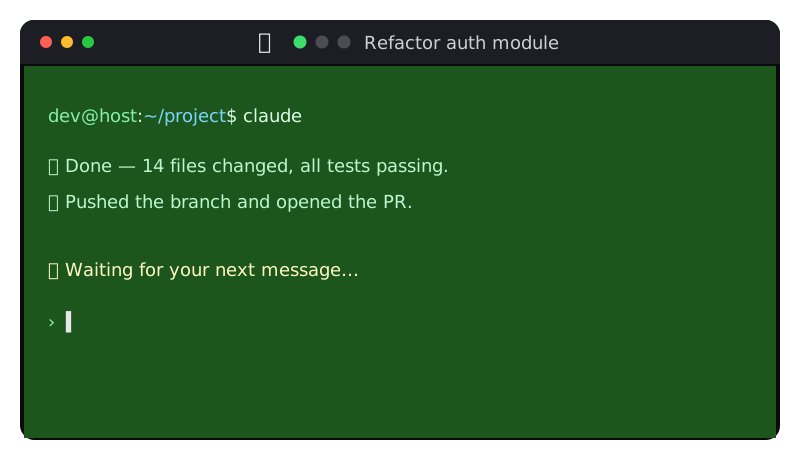
The signal in action: the waiting session is lit green and its title animates so you can spot, at a glance, which chat needs you. (Shown here as a steady tint; the live version gently breathes.)
🎯 The Goal
- Light up only the session that needs attention, not all of them.
- Make it obvious which chat it is, even across identical working directories.
- Persist until you actually respond — no auto-dismiss, no timeout.
- Stay calm and out of the way: a soft glow, not a klaxon.
🪝 Hooks: The Entry Point
Claude Code lets you run shell commands on lifecycle events via hooks in ~/.claude/settings.json. Two of them mean “a human is needed”:
Notification— fires on a permission prompt or after an idle pause.Stop— fires the instant a turn finishes, per session.
And three mean “the human is back, stand down”:
UserPromptSubmit— you sent a message.PreToolUse— Claude resumed work.SessionEnd— the session closed.
So the lifecycle is simple: the attention hooks turn the signal on, the resume hooks turn it off. Each hook receives a JSON payload on stdin with the session_id, cwd, and transcript_path. PreToolUse hooks can also block dangerous commands.
🧨 The Trick: Hooks Have No Terminal
Here’s the wall everyone hits first. The obvious plan is “write some escape codes to the terminal to recolor it.” So you write to /dev/tty from your hook… and nothing happens.
The reason: a hook runs with no controlling terminal of its own. Check it and its tty is ?. There is no /dev/tty to write to. The escape codes vanish into the void.
The fix is to stop looking at the hook’s own process and walk up the process tree to the claude process, which does own a real pseudo-terminal, and write to that slave device directly:
resolve_tty() {
  local pid=$$ ppid tty
  for _ in $(seq 1 8); do
    read -r ppid tty < <(ps -o ppid=,tty= -p "$pid" 2>/dev/null)
    case "$tty" in
      pts/*|tty[0-9]*) printf '/dev/%s' "$tty"; return 0 ;;
    esac
    [ -z "$ppid" ] && break
    pid="$ppid"
  done
  return 1
}
Now you have something like /dev/pts/3 — the real device the terminal emulator is rendering. Write your escape codes there and they show up. That single redirection is the whole ballgame; everything else is decoration.
🎨 Painting the Signal With OSC Codes
Terminals understand OSC (Operating System Command) escape sequences for things like window title and background color. Three are all we need:
# Set the background colour (OSC 11)
printf '\033]11;#164a16\007' > /dev/pts/3
# Reset the background to the terminal default (OSC 111)
printf '\033]111\007'        > /dev/pts/3
# Set the window/tab title (OSC 0)
printf '\033]0;%s\007' "$title" > /dev/pts/3
Because Claude Code draws in the normal screen buffer (not the alternate screen), OSC 11 recolors the whole visible background — so a waiting session literally glows.
🌬️ Breathing, Not Blinking
A static color is easy to tune out, and a hard blink is annoying. So a small detached animator — launched with setsid so it outlives the hook that started it — gently ramps the background through a ramp of greens and back, a full breath every 3.6 seconds:
shades="#0d2b0d #123912 #164a16 #1c561c #246424 #1c561c #164a16 #123912"
while :; do
  for s in $shades; do
    printf '\033]11;%s\007' "$s" > "$tty_dev" || exit 0
    sleep 0.45
  done
done
Green, deliberately — a finished session is good news, not an error. The breath catches your eye in peripheral vision without screaming.
🏷️ A Title That Tells You Which Chat
The background tells you a session needs you; the title tells you which one. Two details made this work:
- You can’t set the title’s text color — that’s controlled by your desktop theme. But colored emoji glyphs render in color even in the taskbar. So the marker is a 🔔 bell plus a green dot that bounces left-to-right through black dots — motion the eye catches instantly:
🔔 🟢⚫⚫→🔔 ⚫🟢⚫→🔔 ⚫⚫🟢. - The real chat name is recovered from the transcript. Claude Code writes its auto-generated topic to the transcript as
ai-titlelines, so the hook reads the latest one and appends it:🔔 ⚫🟢⚫ Refactor auth module. Now a glance at the tab tells you exactly which conversation is waiting.
🛡️ Keeping It Honest
Unattended signals rot unless you design for cleanup:
- One pulser per terminal. Each session’s animator is tracked by a
session_id-keyed pidfile, and starting a new one first kills any stale pulser still targeting that same tty — so two animators can never fight over the title. - Always self-clean. The animator traps
EXIT/TERMand resets the background and title on its way out, so a killed or orphaned process can never leave a terminal stuck green. - Per session, not global. Because
Stopfires for the specific session that finished and the signal is keyed bysession_id, only the terminal that needs you lights up — the others stay dark.
🧪 The Whole Thing, In One Script
Everything above is a fragment — the walk, the three escape codes, the breath, the bouncing dot, the cleanup rules. Assembled, they are one small file.
That description is the spec. The block below is not the author’s own hook script — that source isn’t published. It is a separate, runnable assembly of exactly the pieces described above and nothing else: the same eight-level walk, the same OSC 11/111/0, the same eight shades at 0.45 s, the same session_id-keyed pidfile, the same five hooks. It runs on a stock Linux box with bash, ps, setsid, printf and sleep, and it downloads nothing. The same file also carries the two changes a Mac needs; they are listed line by line under On macOS below.
Save it as claude-cta.sh, chmod +x it, and give all five hooks in ~/.claude/settings.json the same command with the hook’s own name as the argument — /path/to/claude-cta.sh Stop, /path/to/claude-cta.sh PreToolUse, and so on.
#!/usr/bin/env bash
# claude-cta.sh — a persistent per-session terminal signal for Claude Code.
#   Notification, Stop                        -> signal ON  (a human is needed)
#   UserPromptSubmit, PreToolUse, SessionEnd  -> signal OFF (the human is back)
# Wire all five hooks to this file, passing the hook name as $1.

SELF=${BASH_SOURCE[0]}
case $SELF in /*) ;; *) SELF=$PWD/$SELF ;; esac
STATE=${TMPDIR:-/tmp}

# --- a hook has no tty; walk up to the process that does ---------------------
resolve_tty() {
  local pid=$$ ppid tty
  for _ in 1 2 3 4 5 6 7 8; do
    read -r ppid tty < <(ps -o ppid=,tty= -p "$pid" 2>/dev/null)
    case "$tty" in
      pts/*|tty[0-9]*) printf '/dev/%s' "$tty"; return 0 ;;
      ttys[0-9]*)      printf '/dev/%s' "$tty"; return 0 ;;   # macOS: ttys003
    esac
    [ -z "$ppid" ] && break
    pid="$ppid"
  done
  return 1
}

# --- OSC 111 (background back to default) + OSC 0 (plain title) --------------
cta_reset() {
  printf '\033]111\007' > "$1" 2>/dev/null
  printf '\033]0;%s\007' "$2" > "$1" 2>/dev/null
}

# --- one pidfile per session_id ----------------------------------------------
pidfile_for() { printf '%s/claude-cta-%s.pid' "$STATE" "${1//[^A-Za-z0-9._-]/_}"; }

# Kill every recorded pulser painting THIS tty, whoever started it, so two
# animators can never fight over one title. Each one's trap does the resetting.
stop_pulsers_on() {
  local f pid dev
  for f in "$STATE"/claude-cta-*.pid; do
    [ -s "$f" ] || continue
    pid=; dev=
    read -r pid dev < "$f"
    [ -n "$pid" ] && [ "$dev" = "$1" ] || continue
    case $(ps -o args= -p "$pid" 2>/dev/null) in
      *cta-pulse*) kill -TERM "$pid" 2>/dev/null ;;
    esac
    : > "$f"
  done
}

# --- which chat is this? latest ai-title line, else the directory name --------
chat_name() {
  local transcript=$1 dir=$2 line found=
  if [ -n "$transcript" ] && [ -r "$transcript" ]; then
    while IFS= read -r line || [ -n "$line" ]; do
      case $line in
        *ai-title*)
          if [[ $line =~ \"[A-Za-z_-]*[Tt]itle\"[[:space:]]*:[[:space:]]*\"([^\"]+)\" ]]; then
            found=${BASH_REMATCH[1]}
          fi
          ;;
      esac
    done < "$transcript"
  fi
  if [ -n "$found" ]; then printf '%s' "$found"; else dir=${dir:-$PWD}; printf '%s' "${dir##*/}"; fi
}

# --- the breather: OSC 11 through the ramp, OSC 0 bouncing the dot -----------
cta_pulse() {
  local dev=$1 sid=$2 name=$3 pidfile i=0 s
  pidfile=$(pidfile_for "$sid")
  printf '%s %s\n' "$$" "$dev" > "$pidfile"
  trap 'cta_reset "$dev" "$name"; : > "$pidfile"; exit 0' EXIT TERM
  frames=('🟢⚫⚫' '⚫🟢⚫' '⚫⚫🟢')
  shades="#0d2b0d #123912 #164a16 #1c561c #246424 #1c561c #164a16 #123912"
  while :; do
    for s in $shades; do
      printf '\033]11;%s\007' "$s" > "$dev" || exit 0
      printf '\033]0;🔔 %s %s\007' "${frames[i % 3]}" "$name" > "$dev" || exit 0
      i=$(( i + 1 ))
      sleep 0.45
    done
  done
}

# --- the pulser re-enters here, already outliving the hook -------------------
if [ "${1:-}" = cta-pulse ]; then
  shift
  cta_pulse "$1" "$2" "$3"
  exit 0
fi

# --- the hook's JSON payload, without leaving bash ---------------------------
json_field() {
  local key=$1 blob=$2
  if [[ $blob =~ \"$key\"[[:space:]]*:[[:space:]]*\"([^\"]*)\" ]]; then
    printf '%s' "${BASH_REMATCH[1]}"
  fi
}
payload=; chunk=
while IFS= read -r -t 1 chunk || [ -n "$chunk" ]; do payload=$payload$chunk; chunk=; done

sid=$(json_field session_id "$payload"); [ -n "$sid" ] || sid=nosession
cwd=$(json_field cwd "$payload")
transcript=$(json_field transcript_path "$payload")

dev=$(resolve_tty) || exit 0   # nothing up the tree owns a terminal: stay quiet

case ${1:-} in
  Notification|Stop)
    name=$(chat_name "$transcript" "$cwd")
    stop_pulsers_on "$dev"
    if command -v setsid >/dev/null 2>&1; then
      setsid "$BASH" "$SELF" cta-pulse "$dev" "$sid" "$name" </dev/null >/dev/null 2>&1 &
    else   # macOS: no setsid command
      set -m   # job control on: the pulser gets its own process group
      nohup "$BASH" "$SELF" cta-pulse "$dev" "$sid" "$name" </dev/null >/dev/null 2>&1 &
      disown
    fi
    ;;
  UserPromptSubmit|PreToolUse|SessionEnd)
    stop_pulsers_on "$dev"
    cta_reset "$dev" "$(chat_name "$transcript" "$cwd")"
    ;;
esac
exit 0
Which parts are mine and not the author’s: the payload is parsed with a bash regex instead of jq, so the script needs nothing outside bash — the cost is that a backslash-escaped character inside a JSON value is passed through as written. seq 1 8 is spelled out as 1 2 3 4 5 6 7 8 for the same reason. The ai-title format is undocumented, as the caveat below says, so the reader here is deliberately loose: the last "…title": "…" value on any line mentioning ai-title, and the directory name when there is none. The page never says how fast the dot bounces, so this version moves it one slot per shade — it laps every third step and drifts against the eight-shade breath rather than marching with it. Stale pulsers are killed by the pid in their own pidfile, checked against ps first so a recycled pid is never signalled; how the author’s pkill finds them isn’t published. And the hook name arriving as $1 is this file’s convention, not a documented one.
🍎 On macOS
The script above is one file for both systems. Two things in the Linux-only version stop it on a Mac, and each one is fixed by the lines below — everything else is unchanged.
1. macOS names its terminals ttys003, not pts/3. The walk asks ps -o ppid=,tty= for each ancestor’s terminal. On macOS the tty keyword prints the “full name of control terminal” (Apple’s ps(1), from the adv_cmds source Apple publishes); the code behind it prints the device name, or ?? when a process has no terminal (ps/print.c, longtname()), and the XNU kernel creates every pseudo-terminal as /dev/ + ttys%03d — /dev/ttys000, /dev/ttys003, and so on (xnu tty_ptmx.c, PTSD_TEMPLATE). So ps on a Mac answers ttys003, and the Linux pattern tty[0-9]* rejects it: the fourth character is s, not a digit. The walk climbed eight levels, matched nothing, and the hook stayed silent. The fix is one added case arm:
      pts/*|tty[0-9]*) printf '/dev/%s' "$tty"; return 0 ;;
      ttys[0-9]*)      printf '/dev/%s' "$tty"; return 0 ;;   # macOS: ttys003
The first line is untouched and is still tried first. A current Linux names its pseudo-terminals pts/N, so it matches the first arm exactly as before and never reaches the second. The ?? macOS prints for a process with no terminal matches neither arm, which is the same as Linux’s ?: keep climbing.
2. There may be no setsid command. On Linux, setsid is a util-linux program that runs a command in a new session (setsid(1)). On macOS, setsid is documented as a system call for C programs (setsid(2), Mac OS X man page), and the script cannot count on a command of that name being installed. Where there is none, the old setsid "$BASH" … line fails with “command not found” and the ON hook starts nothing. The script now asks first and falls back when the answer is no:
    if command -v setsid >/dev/null 2>&1; then
      setsid "$BASH" "$SELF" cta-pulse "$dev" "$sid" "$name" </dev/null >/dev/null 2>&1 &
    else   # macOS: no setsid command
      set -m   # job control on: the pulser gets its own process group
      nohup "$BASH" "$SELF" cta-pulse "$dev" "$sid" "$name" </dev/null >/dev/null 2>&1 &
      disown
    fi
On Linux command -v setsid succeeds and the very same setsid line as before runs. The fallback is three standard pieces: nohup starts the pulser with SIGHUP ignored (Apple’s nohup(1), shell_cmds source) — its output already goes to /dev/null, so it never writes a nohup.out, which that page says it does only when standard output is a terminal; set -m turns on bash job control, under which “all processes run in a separate process group” (bash manual, The Set Builtin); and disown removes the job from bash’s table so the exiting hook does not pass a SIGHUP to it (Job Control Builtins). What the fallback does not do is start a new session the way setsid does: the pulser gets its own process group inside the hook’s session. The breather never needed a terminal of its own — it writes to the path the walk found — so the difference only shows if something signals that whole session.
How this was tested, and how it wasn’t. It was not run on a Mac. The macOS path was tested with a stubbed ps on Linux, not on a Mac: a test takes resolve_tty() out of this published page, puts a fake ps first on PATH that answers in the macOS format ( 412 ttys003 for the terminal-owning ancestor, ?? for the ones below it), and checks that the walk returns /dev/ttys003; the same test with Linux-format answers (? then pts/7) still returns /dev/pts/7. The nohup fallback was checked on Linux with sleep standing in for the pulser: the background job came back with its own process group ID. That proves the pattern and the detach; it does not prove that whichever bash /usr/bin/env bash finds on your Mac runs every other line of the script, or that Terminal.app repaints on OSC 11. If you run it on a Mac and something breaks, those are the first two places to look.
⚠️ Caveats Worth Knowing
- Terminal support varies. OSC 0 (title) is near-universal, but OSC 11/111 (background recolor) is supported by VTE-based terminals (GNOME Terminal, Ptyxis), iTerm2, kitty, and a few others — not all. Inside
tmuxyou need passthrough. The title animation degrades gracefully even where the background doesn’t recolor. ai-titleis undocumented. Reading the chat name out of the transcript relies on an internal format that could change between Claude Code versions. There’s a fallback to the directory name if it’s missing.- Linux-tested, macOS-tested only by stub. The author’s own setup leans on
ps,setsidandpkill. The script above needsbash,ps,printf,sleep, and eithersetsidornohup; its macOS path has been exercised on Linux with a fakeps, never on a Mac (see On macOS).
📚 Lessons Learned
- The unit that owns the terminal is not the process you’re running in. Once you internalize that a hook has no tty and walk up to the one that does, a whole category of “why won’t my escape codes show up?” problems disappears.
- Persistent beats loud. A signal that quietly stays until you act is far more useful than one that fires once and fades.
- Clean up by construction. Anything that paints the terminal must guarantee it un-paints itself on every exit path, or you’ll eventually stare at a stuck window and curse your past self.
🎯 Final Thought
This started as “I’m tired of missing when a session needs me” and ended as a tidy little system of hooks, a process-tree walk, and three escape codes. No daemon, no dependencies, no cloud — just the terminal you already have, finally telling you when it wants you.
— DankDev
Tags: Claude Code · Terminal · Bash · Hooks · Developer Tools · Linux
Follow new posts by RSS: paste dankdev.com/feed.xml into any feed reader. It is a plain XML file — no signup, no email address, no account. Posts land there the same day they go up, and there is nothing to unsubscribe from later.