Raspberry Pi Bluetooth Tracker
A Node.js scanner for the Raspberry Pi 5 that drives bluetoothctl through node-pty and turns each device's RSSI into metres in data.json. The write-up covers the nine-line formula, the hard-coded -59 dBm TxPower and why distances stretch.
📅
This project uses Node.js to track the distance of Bluetooth devices with a Raspberry Pi 5. But probably works with other Raspberry PI’s and Systems. It utilizes bluetoothctl to scan the area and calculates the distance in meters based on the signal strength.
Scan for nearby Bluetooth devices from the terminal
Before any Node.js, the scan this project automates can be done by hand in bluetoothctl, the interactive control tool that ships with BlueZ, the Linux Bluetooth stack. bluetooth.js issues two of these commands itself: line 6 starts it with scan on, and line 43 runs bluetoothctl info on each device the scan reports.
This machine has no Bluetooth adapter, so nothing here was run for this page: the commands are BlueZ’s documented ones, each cited to the bluetoothctl(1) manual page in the BlueZ source tree, and the field meanings to its org.bluez.Device(5) reference.
What you type, one line at a time — the first starts the tool, the rest are typed at its prompt:
bluetoothctl
scan on
devices
info <MAC>
scan offbluetoothctlopens the prompt. The manual page calls the tool “menu driven but can be automated from the command line” — which is how line 43 uses it, passinginfoand an address as arguments.scan onstarts discovery “for all device types (LE + Classic)” through the adapter’sStartDiscoverymethod (scan).scan leorscan bredrrestrict it to Low Energy or to Classic.deviceslists “all discovered devices” (devices). It takes an optional filter:Paired,Bonded,TrustedorConnected.info <MAC>prints one device’sorg.bluez.Device(5)properties (info). The manual’s own example isinfo 1C:48:F9:9D:81:5C— an address from the documentation, not a device seen here.scan offstops it: the manual’s example is titled “Stop scanning”, and it callsStopDiscovery(scan).
Three fields matter for this project. The address is BlueZ’s Address property, “The Bluetooth device address of the remote device”, written as six colon-separated pairs (XX:XX:XX:XX:XX:XX in the manual); its AddressType is either “public” or “random”. It is what bluetooth.js captures as the device id with ([\w:]+) on lines 18-20.
The name is Name, “The Bluetooth remote name”, and it is marked optional, so a device can have none. BlueZ’s reference advises displaying Alias instead, which falls back to that name when no alias is set. The tracker logs the text after the address on line 39 and never stores it.
RSSI is int16 RSSI [readonly, optional]: “Received Signal Strength Indicator of the remote device (inquiry or advertising)” — a signed integer, and the only number this project turns into a distance.
Line 50 reads it from the info text with /RSSI:\s*(-?\d+)/. Because it is optional, an info reply can lack it; that is the case line 82’s “RSSI or TxPower value not found” message handles.
No sample terminal lines are typed out here. The evidence files behind this page pin no transcript from the project’s recorded run — only the numbers its data.json kept, described further down — and printing a plausible RSSI: line would be inventing a device. The run itself is visible in the first screenshot below, under “Screenshots”.
From there, node bluetooth.js turns those RSSI lines into metres for every device the scan reports, and Bluetooth RSSI to distance shows how to calibrate that conversion for your own room.
Project Source Code
Check out the full project on GitHub: Bluetooth-DistanceFinder
What You Need, and How to Run It
Install bluetoothctl and Node.js, then one npm package, node-pty; the program also needs a directory it can write data.json into. That list is read off the repository’s own files, because its README.md has no installation section and no usage section to copy.
The README is 22 lines — a paragraph of description, then “Key Features”, then “Technologies Used”, then the MIT licence notice. Its package.json is 53 bytes from first brace to last.
So every item below is read off those two files and bluetooth.js itself, and every item says which file — and, where there is one, which line — it comes from.
What you need
bluetoothctl, installed and runnable under that name.bluetooth.jsstarts it twice and never by path: line 6 opens withpty.spawn('bluetoothctl', ['scan', 'on'], and line 43 isspawn('bluetoothctl', ['info', id]). The README calls it “the Bluetooth command-line toolbluetoothctl”. Everything this program knows about the radio arrives as that tool’s console output — the only modules it loads arenode-pty,child_processandfs, so there is no Bluetooth library in it at all.- Node.js. The README’s “Technologies Used” list opens with “Node.js: Core runtime environment.” No version appears in the README, in
package.jsonor inbluetooth.js, andpackage.jsoncarries noenginesfield, so this page names no version either. - One dependency,
node-pty. That is the entirepackage.json:
{
  "dependencies": {
    "node-pty": "^1.0.0"
  }
}
The other two modules are Node’s own — child_process on line 2, fs on line 3 — so nothing else needs installing. Note what is not in those 53 bytes: no devDependencies, no scripts, no main, no name and no version.
- A directory you are happy to write into. Line 98 opens with
fs.writeFile('data.json', deviceDataJson,— a relative path, sodata.jsonis created wherever you launch the process from. The pseudo-terminal running the scanner is given a different working directory: line 10 sets itscwd: process.env.HOME. - No stated hardware. This is worth saying plainly rather than leaving as a gap: none of those three files names a board, a Bluetooth adapter, an operating system or a distribution. The Raspberry Pi 5 at the top of this page is the author’s statement about where he ran it, and the sentence that follows it — “But probably works with other Raspberry PI’s and Systems” — is his hedge, kept as a hedge. This page makes no compatibility claim of its own.
- Nothing to configure. There is no config file and no command-line argument:
process.argvappears nowhere in the file. The only environment it touches is thatcwd: process.env.HOMEon line 10 andenv: process.envon line 11, both handed straight to the scanner rather than used to set anything. The one number you might want to change —const txPower = -59;on line 60, the subject of a later section — is a literal in the source.
How to run it
Two commands. Neither is quoted from the repository, because the repository states none; these are the standard Node ones that the files above imply:
npm install
node bluetooth.js
npm install is what that "dependencies" block asks for, and it is the whole install: one package, no build step, no post-install anything.
bluetooth.js is what you run because package.json names no main and no scripts — nothing in the repository says “run this” on your behalf — and because that file holds the entire program: the three requires on lines 1-3, the scanner on line 6, and the distance function on lines 116-124.
Nothing fetched for this page lists the repository’s other files, so this is not a claim that bluetooth.js is the only one; it is a claim that it is the one that runs.
Then two things are worth knowing before you watch the terminal. It is loud: line 16 prints Output: followed by every chunk bluetoothctl emits, before any parsing happens, so the scanner’s own chatter is interleaved with the distance lines.
And it does not stop on its own — there is no exit call anywhere in the 124 lines, so it scans until you kill it.
data.json will not exist at start-up; it is written inside the handler for bluetoothctl info output, so the file appears only once a first device has been seen and queried, and is then rewritten in full on every reading.
Screenshots
Below are some snapshots of the project in action:
Bluetooth Tracker in Action:
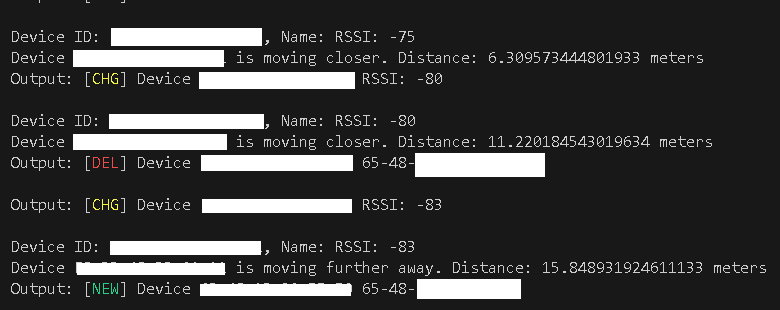
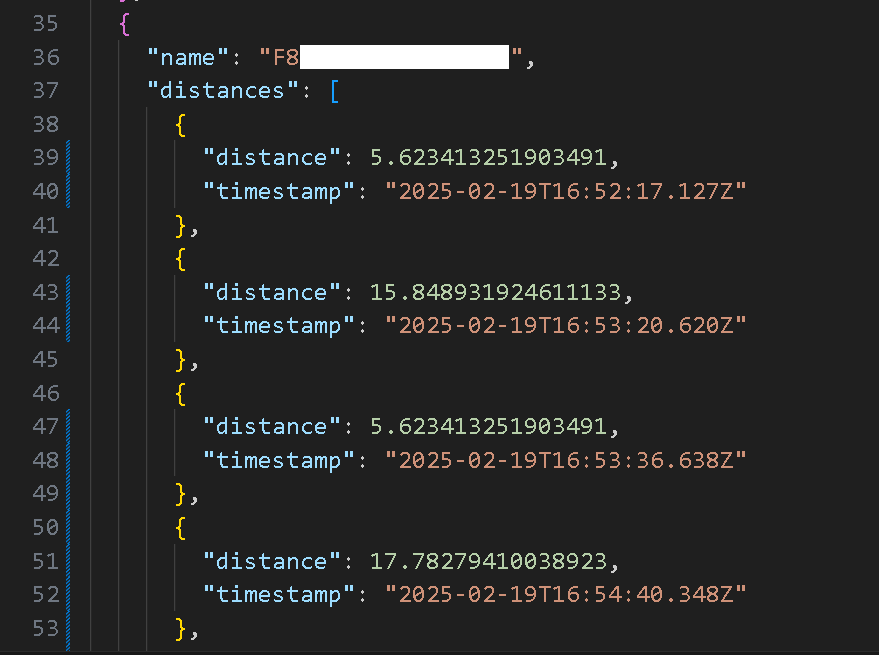
Running the Bluetooth Tracker Automatically creates a data.json files and stores data for each device recorded like this:
The Retired Map: 126 Readings Across 23 Devices
This section once carried a map using the data in data.json showing average distance of devices from the Raspberry Pi. Mac address are obscured in case of laws.
That map is gone, and this page does not draw one. It was an interactive Leaflet 1.9.4 map belonging to the hand-written build this site used to run on, and it was retired on 2026-07-30 when that build was deleted.
What it did is easy to say: it centred on a hardcoded position ([40.7561930997685, -73.98665912607144]), read the data.json file the tracker writes, and drew one coloured circle per device on top of that centre, each circle given a radius in metres equal to that device’s average measured distance. A clickable legend filtered the map down to a single device.
The dataset behind it is the more interesting half, and it is still described here. One scan session on 2025-02-19, running from 16:52 to 17:12 UTC, recorded 126 distance readings across 23 devices, listed as Obscured Device 1 through Obscured Device 23 rather than by MAC address.
Rounded to whole metres, the per-device averages ran from 1 m to 158 m, and 16 of the 23 sat between 8 m and 35 m.
Two limits are worth stating outright, because a map of circles quietly hid both. These distances are inferred from Bluetooth signal strength rather than measured, so they degrade badly past roughly 10-15 m: a 158 m circle means “very weak signal”, not “device 158 m away”.
And the number of readings per device ranged from 1 to 36, so the averages are not equally trustworthy — that 158 m outlier is a single sample, while the nearest device’s 1.4 m is the mean of seven.
How the Tracker Turns Signal Strength Into Metres
Nothing in this project measures a distance. Every “meters” figure it prints, and every radius the retired map drew, is the output of one nine-line function at the bottom of bluetooth.js:
function estimateDistance(rssi, txPower) {
    if (rssi === 0) {
        return -1.0; // if we cannot determine distance
    }

    const ratio = (txPower - rssi) / 20.0;
    const distance = Math.pow(10, ratio);
    return distance;
}
bluetooth.js lines 116-124, from the MIT-licensed Bluetooth-DistanceFinder repository.
Two inputs, both in dBm. RSSI — Received Signal Strength Indicator — is the figure bluetoothctl info prints for a device the adapter can currently hear; the regex that reads it accepts a signed integer. TxPower is the reference point: the strength that device’s signal is taken to have at exactly one metre.
The whole model is the subtraction: when RSSI equals TxPower the answer is exactly one metre, and every decibel by which RSSI falls below TxPower is a decibel of path loss pushing the answer further out. Math.pow(10, ratio) turns that decibel gap back into a ratio of distances.
That is the log-distance path-loss estimate in its standard form, 10 ^ ((TxPower - RSSI) / (10 * n)), where n is the path-loss exponent. The literal 20.0 on line 121 fixes 10 * n at 20, so this code always runs at n = 2.
An exponent of 2 is the free-space case — power falling with the square of the distance, nothing in the way. Indoors there is something in the way: walls, doors, furniture and people all absorb more than empty air, which puts the real exponent above 2.
A larger exponent means the same decibel drop corresponds to a shorter real distance, so a free-space formula run indoors reports distances that are too long — that one constant is why the readings stretch. This page does not attach a number to the indoor exponent, because there is no measurement of that room to attach.
The function has no clamp, no ceiling and no plausibility check: whatever integer the RSSI regex pulls out goes straight into the exponent.
TxPower Is Hard-Coded to -59 for Every Device
The second input never actually arrives. Lines 53-55 build a TxPower: regex and run it against the bluetoothctl info output — and then line 59 comments out the only line that would have used the result:
const rssi = parseInt(rssiMatch[1], 10);
// const txPower = parseInt(txPowerMatch[1], 10);
const txPower = -59; // Default TxPower value
const distance = estimateDistance(rssi, txPower);
bluetooth.js lines 58-61.
So txPowerMatch is computed and thrown away, and every device this tracker has ever seen was treated as if it read exactly -59 dBm at one metre. The code’s own comment calls -59 the “Default TxPower value” — a stand-in for the per-device reference the program stopped reading.
That matters more than it looks, and the direction of the error is worth getting right. txPower is the numerator term in (txPower - rssi) on line 121, so the constant scales every distance a device records by 10 ^ ((-59 - trueTxPower) / 20).
A device whose true one-metre reading is stronger than -59 dBm is therefore under-reported: a weaker reference means a smaller numerator and a smaller answer. Suppose a device’s real reference were -50 dBm, 9 dB stronger than the constant — a worked illustration, not a device anyone here measured.
The tracker reports 10 ^ (-9 / 20) = 0.35 times the distance that reference implies, a factor of 2.82 short — a device ten metres out reads -70 dBm at the receiver and is logged at 3.55 m.
A true reference weaker than -59 dBm makes every recorded distance too long instead. Either way the factor is constant per device, so averaging does not wash the error out, it preserves it exactly. To measure a device’s real reference and your room’s exponent instead of guessing, see how to calibrate it.
One further consequence: the guard on line 57 is if (rssiMatch) alone. It never required txPowerMatch, so a device that advertises no TxPower at all is still measured, silently, at -59. The message on line 82 still reads “RSSI or TxPower value not found in device info”, but only a missing RSSI can reach it now.
What That Constant Produces at Each Signal Level
Because TxPower never varies, the tracker collapses to a function of one variable. The figures below are not measurements — they are 10 ^ ((-59 - RSSI) / 20) worked out by hand at five signal levels, rounded to two decimals:
- -59 dBm → 1.00 m — the reference point; an RSSI equal to TxPower always gives exactly one metre
- -70 dBm → 3.55 m
- -80 dBm → 11.22 m
- -90 dBm → 35.48 m
- -100 dBm → 112.20 m
The shape is the useful part. The exponent is linear in dBm, so each decibel is a constant multiplier: 10 ^ (1 / 20) is 1.12, meaning one dBm of extra loss inflates the reported distance by about 12%, and a 6 dB drop very nearly doubles it (10 ^ (6 / 20) = 1.995).
Near the reference that is harmless — one dBm at -59 dBm moves the answer by 12 cm. At the far end it is fatal: one dBm at -100 dBm is worth 13.69 m going out and 12.20 m coming in.
The 158 m Circle Was One Reading of -103 dBm
The section above says a 158 m circle meant “very weak signal”, not a device 158 m away. With the formula and the constant in hand, that caveat becomes an exact number.
That particular device contributed exactly one reading, so its “average” is the reading.
Solving 10 ^ ((-59 - RSSI) / 20) = 158 gives an RSSI of -102.97 dBm, and parseInt on line 58 only ever yields whole decibels — so exactly one integer can produce that circle: -103 dBm, which the formula turns into 158.49 m, rounding to 158.
Its neighbours are not close. -102 dBm gives 141.25 m, and -104 dBm gives 177.83 m.
So the largest circle on that map was one line of bluetoothctl info output reporting -103 dBm, pushed through a free-space formula carrying a borrowed reference power, and drawn as a 158-metre radius. Each step is defensible on its own terms; the composition is not a position.
Where the Readings Come From
package.json in that repository declares exactly one dependency: "node-pty": "^1.0.0". Everything else is Node’s standard library — line 2 requires child_process, line 3 requires fs.
The README’s “Technologies Used” section lists four bullets and no more: Node.js, node-pty (“Spawns and interacts with the bluetoothctl process”), child_process (“Executes bluetoothctl info commands to retrieve device details”) and File System (“Manages data storage in data.json”) — that last bullet naming in prose the fs module line 3 requires.
Lines 6-12 spawn bluetoothctl scan on inside a pseudo-terminal rather than as a plain child process: 80 columns by 30 rows, xterm-color, inheriting the current environment and running in process.env.HOME.
Lines 18-20 are three regexes, one each for the [NEW], [CHG] and [DEL] device lines bluetoothctl prints, and each captures the device id plus the trailing text. A [NEW] or [CHG] match is what triggers a reading. A [DEL] match does not: lines 28-32 match it and return immediately.
A device going away is never recorded, so its last distance sits in data.json with its old timestamp and nothing in the file marks it as gone.
When a device does match, line 43 spawns a second process — bluetoothctl info <id> — and lines 49-55 pull RSSI: and TxPower: out of its standard output with two more regexes.
What data.json Holds
Lines 86-98 rebuild the whole file on every single reading. The in-memory Map of devices is flattened into an array, serialised with JSON.stringify(deviceDataArray, null, 2), and written over data.json with fs.writeFile; nothing appends, and the callback on lines 99-101 only logs, so a failed write never stops the run. The result is the structure the second screenshot shows.
Each element carries two keys and no more. name holds the device id captured by the regexes on lines 18-20 — a MAC-style identifier, not a friendly name; the friendly name is match[2], logged on line 39 and never stored. distances is an array of { distance, timestamp } pairs, pushed in the order the readings arrived.
Distances are stored raw: the double that comes out of Math.pow on line 122 goes into the file untouched, with no rounding step anywhere between there and the JSON.stringify on line 95. The sentinel is stored raw too.
When estimateDistance receives an RSSI of 0 it returns -1.0 under the comment “if we cannot determine distance”, and nothing filters that before it is written. A -1 in distances is not a device a metre behind the Pi; it is a reading that failed.
Anything averaging this file has to exclude it, because bluetooth.js will not — there is no averaging anywhere in its 124 lines. The per-device means behind the retired map were computed afterwards, from the file.
What the Code Does Not Do
The “moving closer” and “moving further away” lines the tracker prints come from lines 68-74, and they compare exactly two numbers: the new distance and the immediately previous one, with a strict < and a strict >. There is no smoothing, no moving average, no dead band and no minimum change.
The third branch — “is at the same distance” — survives only because of the hard-coding: with TxPower fixed and parseInt yielding whole decibels, estimateDistance can return just one value per integer RSSI, so “same distance” means “identical integer RSSI”.
Anything else is a flip, and by the 12%-per-decibel curve above, one dBm of ordinary radio jitter is enough to cause one — at -100 dBm, that flip is announced as 13.69 m of movement.
Three more things it does not do:
- It does not deduplicate or rate-limit. Every matching
[NEW]and[CHG]line spawns anotherbluetoothctl infocall and appends another reading, so a device that changes properties often piles up samples faster than a quiet one. That is a property of the code, not a claim about the run recorded above; the 1-to-36 spread in that dataset is consistent with it, but nothing here measures which devices were chatty. - It does not track departures, because of the early return on line 31.
- It does not use the device’s own TxPower, because of the comment on line 59.
The last of those is a one-line fix: uncommenting line 59 and guarding it on txPowerMatch would put each device’s own reference power back into the estimate.
The 20.0 on line 121 is where the environment lives — it is 10 * n, so raising it is how you would move off the free-space assumption. Neither is in the code as it stands.