Convert MP4 to GIF With ffmpeg, and the File Size Each Setting Costs
📅 October 13, 2026 · ⏱️ 22 min read
To convert an MP4 to a GIF with ffmpeg: ffmpeg -i in.mp4 -vf "fps=15,scale=480:-1:flags=lanczos,split[s0][s1];[s0]palettegen[p];[s1][p]paletteuse" out.gif. Read the filter chain left to right: fps=15 keeps 15 frames a second, scale=480:-1:flags=lanczos makes the picture 480 pixels wide with the height following the video’s shape, split sends the frames down two paths, palettegen builds one colour palette for the whole clip from the first path, and paletteuse redraws the second path in that palette’s colours. A GIF can only show a limited palette of colours, and without the last three steps ffmpeg uses the same fixed colours for every video, which is why a plain ffmpeg -i in.mp4 out.gif comes out speckled and off-colour.
ffmpeg -i in.mp4 -vf "fps=15,scale=480:-1:flags=lanczos,split[s0][s1];[s0]palettegen[p];[s1][p]paletteuse" out.gifEvery command on this page ran on ffmpeg 4.4.2, the version Ubuntu 22.04 ships, and what it printed is shown under it. One test clip goes through each setting in turn: no palette against a palette, 10 frames a second against 15, 320 pixels wide against 480, three ways of dithering, and a 64-colour palette against the full one. Each GIF’s size is the byte count stat printed, and its colour accuracy is a PSNR figure ffmpeg computed against the clip, so the trade each setting makes is a number, not an impression. The table below has them all in one place. The ffmpeg.org documentation linked from this page was read on 2026-10-13, and where 4.4.2 behaves differently from it, the last section of the page says so.
The test clip
The input is made by ffmpeg itself, so you can rebuild it: 4 seconds of the mandelbrot source, which is documented to “Generate a Mandelbrot set fractal, and progressively zoom towards the point specified with start_x and start_y.” It has smooth colour gradients, which are what a GIF’s limited palette handles worst, and because it zooms, nearly every pixel changes on every frame. That second part matters for the sizes below: ffmpeg’s GIF encoder saves bytes on parts of a frame that stay the same (its help lists -gifflags with (default offsetting+transdiff)), and a zoom gives it little of that to work with. A screen recording where most of the frame stands still will come out at different sizes; this page did not measure one.
The block also defines report, which prints a GIF’s size in bytes and how close its colours are to the clip. The closeness is the psnr filter, which will “Obtain the average, maximum and minimum PSNR (Peak Signal to Noise Ratio) between two input videos.” The GIF is compared with the clip at the same frame rate and width, frame by frame, so the figure measures only the colours the GIF lost, not the frames or pixels it dropped on purpose. Higher is closer.
# The clip: 4 seconds of ffmpeg's mandelbrot pattern (a slow zoom), 1280x720 at 30 fps, H.264.
ffmpeg -v error -f lavfi -i "mandelbrot=s=1280x720:r=30,trim=duration=4" -c:v libx264 -pix_fmt yuv420p in.mp4
ffprobe -v error -count_frames -show_entries stream=codec_name,width,height,r_frame_rate,nb_read_frames -of csv=p=0 in.mp4
stat -c '%s bytes  %n' in.mp4

# report GIF FPS WIDTH: the GIF's size in bytes, and how close its colours are to the clip
# at the same frame rate and width: the average PSNR over all frames, in dB (higher is closer).
report() {
  p=$(ffmpeg -i "$1" -i in.mp4 -lavfi "[0:v]settb=1/$2,setpts=N,format=rgb24[a];[1:v]fps=$2,scale=$3:-1:flags=lanczos,format=rgb24,settb=1/$2,setpts=N[b];[a][b]psnr" -f null - 2>&1 | grep -o 'average:[0-9.]*')
  echo "$1: $(stat -c %s "$1") bytes, PSNR ${p#average:} dB"
}
h264,1280,720,30/1,120
2241971 bytes in.mp4in.mp4 is 1280x720, 120 frames at 30 a second, and 2241971 bytes.
The same GIF in two steps
The one-line command runs palettegen and paletteuse in one filter graph, joined by split, which is documented to “Split input into several identical outputs.” Many guides give the older two-step form instead: the first command writes the palette to a PNG, the second reads it back. Both forms gave the same file, byte for byte:
# The same GIF in two steps: palettegen writes the palette to a PNG, paletteuse reads it back.
ffmpeg -v error -i in.mp4 -vf "fps=15,scale=480:-1:flags=lanczos,palettegen" palette.png
ffmpeg -v error -i in.mp4 -i palette.png -filter_complex "fps=15,scale=480:-1:flags=lanczos[x];[x][1:v]paletteuse" two-step.gif
cmp out.gif two-step.gif && echo "out.gif and two-step.gif are identical"
ffprobe -v error -show_entries stream=width,height -of csv=p=0 palette.png
ffprobe -v error -count_frames -show_entries stream=width,height,nb_read_frames -of csv=p=0 out.gif
report out.gif 15 480
out.gif and two-step.gif are identical
16,16
480,270,60
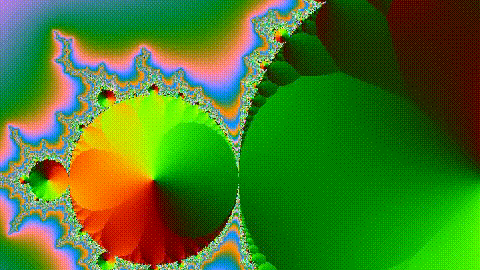
out.gif: 4412346 bytes, PSNR 34.044291 dBpalette.png is 16x16, which is 256 pixels: one per palette entry. The paletteuse documentation says “The palette must be a 256 pixels image.” The scale filter turned 1280x720 into 480x270: with -1 as the height, “the scale filter will use a value that maintains the aspect ratio of the input image”. fps=15 kept 60 of the 120 frames, 15 a second for 4 seconds; the fps filter is documented to “Convert the video to specified constant frame rate by duplicating or dropping frames as necessary.”
The two-step form is worth keeping for one job: making several GIFs that share one palette, or looking at palette.png to see which colours the clip got. For a single GIF the one-liner does the same work without the extra file.
Every setting in one table
Every GIF below came from the same in.mp4. The rows marked out.gif are the command at the top of the page (15 fps, 480 wide, the default dither and 256 colours), and each other row changes one thing from it. The PSNR column is the colour closeness from report. The commands and their raw output are in the sections after the table.
| Setting | Value | File | Bytes | vs out.gif | PSNR |
|---|---|---|---|---|---|
| Palette | none, 1280 wide, 30 fps | naive.gif | 27079412 | 614% | 21.6 dB |
| Palette | none, 480 wide, 15 fps | naive-480.gif | 2436084 | 55% | 21.6 dB |
| Palette | palettegen + paletteuse | out.gif | 4412346 | 100% | 34.0 dB |
| fps | 15 | out.gif | 4412346 | 100% | 34.0 dB |
| fps | 10 | fps10.gif | 3008120 | 68% | 34.2 dB |
| Width | 480 | out.gif | 4412346 | 100% | 34.0 dB |
| Width | 320 | w320.gif | 2074995 | 47% | 34.2 dB |
| dither | sierra2_4a (the default) | out.gif | 4412346 | 100% | 34.0 dB |
| dither | bayer | dither-bayer.gif | 4200411 | 95% | 33.2 dB |
| dither | none | dither-none.gif | 3599984 | 82% | 35.3 dB |
| max_colors | 256 (the default) | out.gif | 4412346 | 100% | 34.0 dB |
| max_colors | 64 | colors64.gif | 2982045 | 68% | 27.3 dB |
What the table says, in order of how much each setting is worth:
- Frame rate and width are where the bytes are. Dropping to 10 fps cut the file to 68%, and 320 wide cut it to 47%, while PSNR stayed at 34.2 dB in both: they lose motion and detail, not colour.
- The palette costs bytes and buys colour.
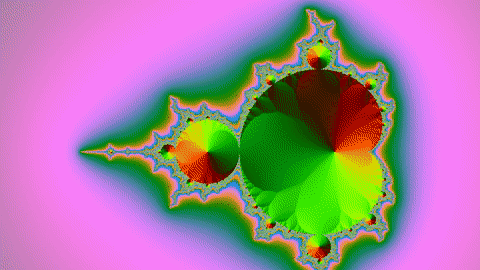
naive-480.gifis smaller thanout.gif(55%) and much worse: 21.6 dB against 34.0 dB, and the frames below show the difference. - Fewer palette colours save less than you would think. 64 colours instead of 256 saved a third of the bytes (68%) and cost far more colour accuracy (27.3 dB) than any other change with a palette.
- Dither is a matter of taste, and PSNR misreads it.
dither=nonescored highest and was 82% of the size, but it shows bands in smooth gradients that the default hides.
No palette against a palette
# No palette at all: the GIF encoder gets every frame at full size and 30 fps.
ffmpeg -v error -i in.mp4 naive.gif
# No palette, but the same frame rate and width as out.gif.
ffmpeg -v error -i in.mp4 -vf "fps=15,scale=480:-1:flags=lanczos" naive-480.gif
# The pixel format ffmpeg picks for the GIF encoder when no palette is given.
ffmpeg -i in.mp4 -frames:v 1 one.gif 2>&1 | grep -o 'Video: gif, [a-z0-9]*'
report naive.gif 30 1280
report naive-480.gif 15 480
report out.gif 15 480
Video: gif, bgr8
naive.gif: 27079412 bytes, PSNR 21.603267 dB
naive-480.gif: 2436084 bytes, PSNR 21.585088 dB
out.gif: 4412346 bytes, PSNR 34.044291 dBThe plain ffmpeg -i in.mp4 naive.gif keeps all 120 frames at 1280x720 and comes out at 27079412 bytes: 12.1 times the MP4 it came from, and 6.1 times out.gif. Most of that is size and frame rate, not the missing palette. The fairer comparison is naive-480.gif, made at the same 15 fps and 480 wide as out.gif: it is the smaller file, 55% of out.gif, but its PSNR is 21.6 dB against 34.0 dB.
The reason is the pixel format on the first output line. 4.4.2’s GIF encoder takes rgb8 bgr8 rgb4_byte bgr4_byte gray pal8 (its help, Supported pixel formats), and with no palette ffmpeg chose bgr8: blue, green and red packed into one byte per pixel, the same 8-bit layout for every video, whatever colours the video has. pal8 is the format that carries its own palette, and the log of the command at the top of the page shows out.gif was written as Video: gif, pal8.
Frame rate: 10 against 15
# 10 frames a second instead of 15.
ffmpeg -v error -i in.mp4 -vf "fps=10,scale=480:-1:flags=lanczos,split[s0][s1];[s0]palettegen[p];[s1][p]paletteuse" fps10.gif
report fps10.gif 10 480
# How long each frame stays on screen, in hundredths of a second, and how many frames get it.
for g in fps10.gif out.gif naive.gif; do
  echo "$g:"; ffprobe -v error -select_streams v -show_entries packet=duration -of csv=p=0 "$g" | sort -n | uniq -c
done
fps10.gif: 3008120 bytes, PSNR 34.155597 dB
fps10.gif:
40 10
out.gif:
21 6
39 7
naive.gif:
79 3
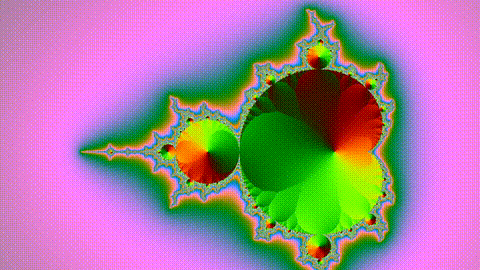
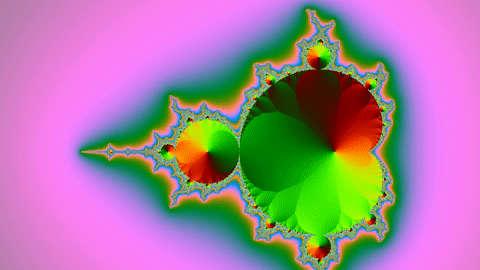
41 4At 10 fps the GIF has 40 frames instead of 60 and is 68% of the size. Per frame the two are close: 75203 bytes at 10 fps and 73539 at 15, so on this clip the file size simply follows the number of frames.
The second part of the output is why 10 is a tidy number for a GIF. The gif muxer documentation says “the delay between two frames can therefore not be smaller than one centisecond”, and every delay is a whole number of hundredths. At 10 fps every frame is shown for exactly 10 hundredths, 400 in all. At 15 fps a frame should last 6.67 hundredths, so ffmpeg mixed 21 frames of 6 with 39 frames of 7 to total 399. The 30 fps naive.gif mixed 3 and 4 for 401. Both totals are within one hundredth of the clip’s 4 seconds, but the frames are not evenly spaced. A frame rate gives every frame the same delay only when 100 divided by it is a whole number.
Width: 320 against 480
# 320 pixels wide instead of 480.
ffmpeg -v error -i in.mp4 -vf "fps=15,scale=320:-1:flags=lanczos,split[s0][s1];[s0]palettegen[p];[s1][p]paletteuse" w320.gif
ffprobe -v error -show_entries stream=width,height -of csv=p=0 w320.gif
report w320.gif 15 320
320,180
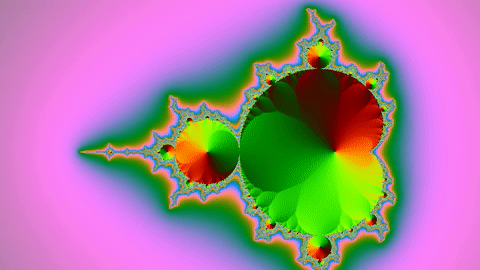
w320.gif: 2074995 bytes, PSNR 34.224819 dB320x180 is 44% of the pixels of 480x270, and the file came out at 47% of the size. Width is the setting to reach for first when a GIF is too big: the size falls with the pixel count and the colours stay as good. flags=lanczos picks the scaling method; 4.4.2’s help for the scale filter gives Flags to pass to libswscale (default "bilinear"), so without it the resize is bilinear.
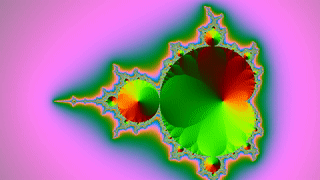
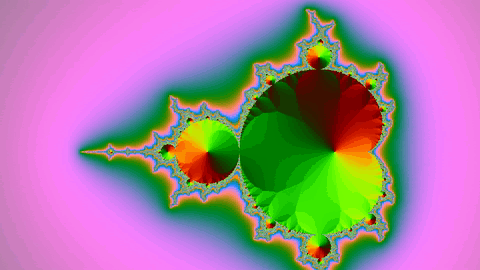
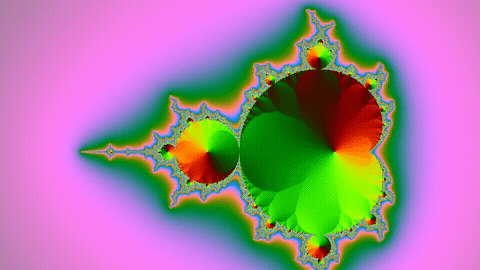
Dither: none, bayer, sierra2_4a
With a palette of a few hundred colours, a smooth gradient has to be drawn from colours that do not quite match. Dithering mixes neighbouring palette colours in a pattern so the eye sees the colour in between; without it, a gradient turns into visible steps. paletteuse’s dither option picks the method: the documentation lists bayer as “Ordered 8x8 bayer dithering (deterministic)”, none as “Disable dithering.”, and says “Default is sierra2_4a.”
# No dithering, and ordered (bayer) dithering, against the default.
ffmpeg -v error -i in.mp4 -vf "fps=15,scale=480:-1:flags=lanczos,split[s0][s1];[s0]palettegen[p];[s1][p]paletteuse=dither=none" dither-none.gif
ffmpeg -v error -i in.mp4 -vf "fps=15,scale=480:-1:flags=lanczos,split[s0][s1];[s0]palettegen[p];[s1][p]paletteuse=dither=bayer" dither-bayer.gif
# Naming the default, sierra2_4a, gives the same bytes as out.gif.
ffmpeg -v error -i in.mp4 -vf "fps=15,scale=480:-1:flags=lanczos,split[s0][s1];[s0]palettegen[p];[s1][p]paletteuse=dither=sierra2_4a" dither-sierra2_4a.gif
cmp out.gif dither-sierra2_4a.gif && echo "out.gif and dither-sierra2_4a.gif are identical"
report dither-none.gif 15 480
report dither-bayer.gif 15 480
out.gif and dither-sierra2_4a.gif are identical
dither-none.gif: 3599984 bytes, PSNR 35.284346 dB
dither-bayer.gif: 4200411 bytes, PSNR 33.187024 dBdither=none made the smallest file of the three, 82% of out.gif, and the highest PSNR, 35.3 dB. That does not make it the best-looking. PSNR scores each pixel by how far it is from the original, and dithering deliberately puts pixels off by a little in a pattern, so it loses points for exactly what makes a gradient look smooth. Look at the pink background in the two frames below: without dithering it is drawn in curved bands; with bayer it is smooth from a distance and shows a fine cross-hatch up close. Dithered pixels also vary from frame to frame where the picture itself barely changes, which leaves the encoder fewer unchanged pixels to skip; that is the likely source of the 18% that none saves, though this page measured only the sizes. bayer came out at 95% of the default.
If your clip is flat colours, such as a screen recording of a terminal or a slide, dither=none is the better choice: there are no gradients to band, and it made the smallest file here. For camera footage and anything with gradients, keep the default.
A smaller palette: max_colors=64
palettegen’s max_colors sets how many colours the palette may hold. 4.4.2’s help gives its range and default as (from 4 to 256) (default 256). The documentation adds: “Note: the palette will still contain 256 colors; the unused palette entries will be black.” By default one entry is also held back for transparency: reserve_transparent will “Create a palette of 255 colors maximum and reserve the last one for transparency.”
# A 64-colour palette instead of the default 256.
ffmpeg -v error -i in.mp4 -vf "fps=15,scale=480:-1:flags=lanczos,split[s0][s1];[s0]palettegen=max_colors=64[p];[s1][p]paletteuse" colors64.gif
report colors64.gif 15 480
colors64.gif: 2982045 bytes, PSNR 27.263082 dBA quarter of the colours gave 68% of the size, and the PSNR fell from 34.0 to 27.3 dB, the biggest loss of any palette setting on this page. Going to 10 fps saved the same share of bytes, and 320 wide saved more, with no loss of colour at all. max_colors is worth lowering when the clip really has few colours, such as a diagram or a UI recording; look at a frame before trusting it.
Looping: -loop 0 and -loop -1
The gif muxer’s loop option sets how many times the GIF plays. The documentation says: “Set the number of times to loop the output. Use -1 for no loop, 0 for looping indefinitely (default).” So a GIF made with no -loop at all loops forever, and -loop -1 makes it play once and stop. It is an output option, so it goes after the input, just before the output name.
# The same GIF with -loop 0, -loop -1 and -loop 3. -c copy keeps out.gif's frames exactly as
# they are, so the loop setting is the only thing that changes.
for n in 0 -1 3; do ffmpeg -v error -i out.gif -c copy -loop $n loop$n.gif; done
cmp out.gif loop0.gif && echo "out.gif and loop0.gif are identical"
stat -c '%s bytes  %n' loop0.gif loop-1.gif loop3.gif
# 16 bytes from where the name NETSCAPE2.0 starts in each file, in hex.
for f in loop0.gif loop-1.gif loop3.gif; do
  o=$(grep -abo NETSCAPE2.0 "$f" | cut -d: -f1)
  if [ -n "$o" ]; then echo "$f:$(od -An -tx1 -j "$o" -N 16 "$f")"; else echo "$f: no NETSCAPE2.0 in the file"; fi
done
# -loop placed before -i: ffmpeg reads it as an option for the input file.
ffmpeg -v error -loop 0 -i in.mp4 wrong.gif 2>&1; echo "exit status $?"
out.gif and loop0.gif are identical
4412346 bytes loop0.gif
4412327 bytes loop-1.gif
4412346 bytes loop3.gif
loop0.gif: 4e 45 54 53 43 41 50 45 32 2e 30 03 01 00 00 00
loop-1.gif: no NETSCAPE2.0 in the file
loop3.gif: 4e 45 54 53 43 41 50 45 32 2e 30 03 01 03 00 00
Option loop not found.
exit status 1What the bytes show:
-loop 0changed nothing:loop0.gifis the same file asout.gif, because 0 is the default.-loop -1made the file 19 bytes smaller. It has noNETSCAPE2.0block at all, and a GIF with no such block plays once.-loop 3made a file of the same size as-loop 0, and in the 16 bytes printed, only the one after03 01changed:00for 0,03for 3.-loop 0before-i in.mp4failed withOption loop not found.and exit status 1. The ffmpeg documentation explains why: “As a general rule, options are applied to the next specified file.” Before-i,-loopis an option for readingin.mp4, and the MP4 reader has none.
The frames
The frames on this page are the PNGs this block wrote, one at 2 seconds from each GIF. naive.gif is 1280x720, so its frame is cropped to the middle at full size instead of scaled, which would have blended its colours. Their SHA-256 hashes are in the page’s evidence file.
# The frame at 2 seconds of each GIF, saved as a PNG for this page. naive.gif is 1280x720, so
# its frame is cropped to the middle 480x270 at full size rather than scaled down.
ffmpeg -v error -i naive.gif -ss 2 -frames:v 1 -vf "crop=480:270" -pix_fmt rgb24 naive.png
for g in naive-480 out fps10 w320 dither-none dither-bayer colors64; do
  ffmpeg -v error -i "$g.gif" -ss 2 -frames:v 1 -pix_fmt rgb24 "$g.png"
done
sha256sum naive.png naive-480.png out.png fps10.png w320.png dither-none.png dither-bayer.png colors64.png
e2b76a3017109d2c2e3e6febd4689be08e838d52907c652711bca36e2e2998a9 naive.png
696fa2b61409ffa95e051cb48d568db1527df8c56462972ebf2d7200d0ad9e78 naive-480.png
72c5e19c9e06b997b9cd8cb9625dcc6b2ae9cba532c14c9fea17021aa5ad424e out.png
06d64ea6af70a2384562ba49b1d8ebaa54d78a26fedb1487d98fa6a603891c7b fps10.png
9a21543c5321bc5fd91e1003ed727e88c9a1eb7606f7145b30bf01ecc1072ab7 w320.png
adf5696b831173ffca3a4253408a779271b524d9796393a888b7235c8d78af22 dither-none.png
e5189131abb3811d6d05a560d05d5b4ef4b3966ad9ca2b8427e9f5ca8adace0a dither-bayer.png
80271450e560ff6396c5bbc8b5a5e77af456b95a2f2c7cc1b0e52fc46c8cd147 colors64.pngWhere ffmpeg 4.4.2 and today’s documentation differ
The documentation on ffmpeg.org is for the current release, and a few things on these pages are not in 4.4.2:
# Three dither modes in today's documentation, tried on ffmpeg 4.4.2.
for d in sierra3 burkes atkinson; do
  ffmpeg -v error -i in.mp4 -vf "fps=15,scale=480:-1:flags=lanczos,split[s0][s1];[s0]palettegen[p];[s1][p]paletteuse=dither=$d" -frames:v 1 "$d.gif" 2>&1 | grep -m1 -o "Unable to parse option value \"$d\""
done
Unable to parse option value "sierra3"
Unable to parse option value "burkes"
Unable to parse option value "atkinson"- Today’s paletteuse documentation lists
sierra3,burkesandatkinson; 4.4.2 rejects all three. The modes it has arebayer,heckbert,floyd_steinberg,sierra2,sierra2_4aandnone. - 4.4.2’s help for paletteuse does not list
noneat all, butdither=noneran without an error above and made a different file from the default. - The gif muxer’s documentation heads the option
loop bool, though it takes -1 and 0; 4.4.2’s help calls it<int>with the range(from -1 to 65535) (default 0).
Before the GIF: cut the clip, or keep the MP4
A GIF of a long video is a long GIF, and the size grows with every frame. Cut out the seconds you want first: cutting on the exact frame needs a re-encode, and a copy cut starts at the keyframe before, and the GIF command then runs on the short clip. If what you need is a small file rather than a GIF, an MP4 is the better format: here the 2241971-byte MP4 was 51% of the size of the 4412346-byte palette GIF, with 7.1 times the pixels and twice the frame rate, and how far an MP4 can shrink with CRF is measured in the ffmpeg compress post.
The Raspberry Pi pipeline that makes YouTube Shorts ends with an MP4. The command at the top of this page turns a clip of it into a GIF for a README, an issue or a chat message, where a video would not play inline. The settings carry over: set the width first, keep 10 or 15 fps, and leave the palette and dither at their defaults unless the clip is flat colour.
What this page does not cover: GIFs with transparent backgrounds, a palette per frame (paletteuse’s new option), stats_mode=diff for clips with a still background, and other formats for short loops, such as animated WebP. Each changes the sizes above, and none of them was measured here.
Follow new posts by RSS: paste dankdev.com/feed.xml into any feed reader. It is a plain XML file — no signup, no email address, no account. Posts land there the same day they go up, and there is nothing to unsubscribe from later.