Add a Logo Watermark to a Video With ffmpeg
📅 October 12, 2026 · ⏱️ 22 min read
To add a logo to a video with ffmpeg: ffmpeg -i in.mp4 -i logo.png -filter_complex "overlay=W-w-24:24" -c:a copy out.mp4. The overlay filter draws its second input, the logo, on top of its first, the video. The two values after overlay= are the x and y of the logo’s top-left corner: W and H are the video’s width and height, w and h the logo’s, so W-w-24:24 puts the logo in the top-right corner, 24 pixels in from the right edge and 24 down from the top. -c:a copy keeps the sound as it is; the picture is re-encoded, because a filter changed it.
ffmpeg -i in.mp4 -i logo.png -filter_complex "overlay=W-w-24:24" -c:a copy out.mp4Every command on this page ran on ffmpeg 4.4.2, the version Ubuntu 22.04 ships, and what it printed is shown under it. The sections below measure where each corner expression puts the logo, why an odd number moves it by a pixel, a logo sized to a fixed share of the video’s width, a half see-through logo, and a logo that shows only for a few seconds. Each position is found by comparing a frame with the logo against the same frame without it, pixel by pixel, so it is what ffmpeg did, not what the expression should do.
The test video and the logo
Both inputs are made by ffmpeg itself, so you can rebuild them: the video is 4 seconds of the testsrc2 test pattern with a tone, and the logo is drawn with lavfi and saved as a PNG with an alpha channel. No downloaded image is used. The drawbox filter draws the logo’s border; its x and y are “The expressions which specify the top left corner coordinates of the box.”, and for its thickness t, “A value of fill will create a filled box. Default value is 3.”
The block also defines three helpers. raw saves the first frame ffmpeg makes as raw RGB bytes, before any encoding, so H.264’s compression cannot add differences of its own. box compares two such frames byte by byte with cmp and prints where the area that differs starts and how big it is. px prints one pixel’s red, green and blue values.
# The video: 4 seconds of ffmpeg's testsrc2 pattern, 1280x720 at 30 fps, with a 440 Hz tone.
ffmpeg -v error -f lavfi -i "testsrc2=s=1280x720:r=30:d=4" -f lavfi -i "sine=frequency=440:sample_rate=48000:duration=4" \
  -c:v libx264 -pix_fmt yuv420p -c:a aac -shortest in.mp4
# The logo: a 200x100 orange rectangle with an 8-pixel white border, drawn by lavfi and
# saved as a PNG with an alpha channel (rgba).
ffmpeg -v error -f lavfi -i "color=c=0xFF8000:s=200x100,format=rgba,drawbox=x=0:y=0:w=200:h=100:t=8:c=white" -frames:v 1 logo.png
ffprobe -v error -show_entries stream=codec_name,width,height,pix_fmt -of csv=p=0 in.mp4
ffprobe -v error -show_entries stream=codec_name,width,height,pix_fmt -of csv=p=0 logo.png

# raw OUT ARGS...: the first frame ffmpeg makes from ARGS, before any encoding, as raw RGB bytes.
raw() { o=$1; shift; ffmpeg -v error "$@" -frames:v 1 -f rawvideo -pix_fmt rgb24 -y "$o"; }
# box A B WIDTH: compare two raw frames of that width, byte by byte; print the top-left
# pixel of the area that differs and its size.
box() {
  cmp -l "$1" "$2" | awk -v W="$3" '{ p = int(($1 - 1) / 3); x = p % W; y = int(p / W)
    if (!n++) { x0 = x1 = x; y0 = y1 = y }
    if (x < x0) x0 = x; if (x > x1) x1 = x; if (y < y0) y0 = y; if (y > y1) y1 = y }
    END { if (n) print "differs from x=" x0 " y=" y0 ", " (x1 - x0 + 1) "x" (y1 - y0 + 1) " pixels"; else print "no pixel differs" }'
}
# px FILE WIDTH X Y: the red, green and blue values of one pixel of a raw frame.
px() { od -An -tu1 -j $(( ($4 * $2 + $3) * 3 )) -N3 "$1" | xargs; }
h264,1280,720,yuv420p
aac
png,200,100,rgbaThe video is 1280x720 H.264 with AAC sound; the logo is a 200x100 PNG whose pixels carry red, green, blue and alpha (rgba). The answer command on these two files:
ffprobe -v error -select_streams v -count_frames -show_entries stream=codec_name,width,height,nb_read_frames -of csv=p=0 out.mp4
ffprobe -v error -select_streams a -show_entries stream=codec_name,channels -of csv=p=0 out.mp4
h264,1280,720,120
aac,1out.mp4 keeps the video’s size and all 120 frames (4 seconds at 30 fps), and the logo is on every one of them although logo.png is a single picture: when the second input ends, overlay repeats its last frame. In 4.4.2’s ffmpeg -h filter=overlay, eof_action is “(default repeat)”, and repeat is “Repeat the previous frame.” The sound is the original AAC track, copied.
Any corner: the x and y expressions
The overlay documentation, read on 2026-10-12, says x and y “Set the expression for the x and y coordinates of the overlaid video on the main video.” Inside them, main_w, W and main_h, H are “The main input width and height.” and overlay_w, w and overlay_h, h are “The overlay input width and height.” Its own first example uses the long names: overlay=main_w-overlay_w-10:main_h-overlay_h-10 is to “Draw the overlay at 10 pixels from the bottom right corner of the main video”.
Here each corner, with a 24-pixel margin, and the centre, each compared with the same frame without a logo:
# The same frame without a logo, then with the logo at each corner, 24 pixels in from both
# edges, and in the centre.
raw base.rgb -i in.mp4
for xy in 24:24 W-w-24:24 24:H-h-24 W-w-24:H-h-24 "(W-w)/2:(H-h)/2"; do
  raw with.rgb -i in.mp4 -i logo.png -filter_complex "overlay=$xy"
  echo "overlay=$xy: $(box with.rgb base.rgb 1280)"
done
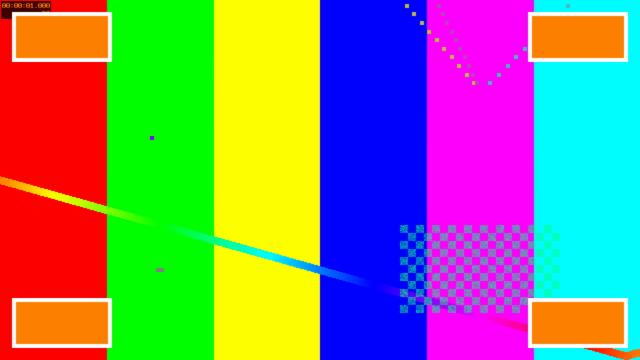
# All four corners at once, one frame at 1 second, scaled to 640x360 for this page.
ffmpeg -v error -i in.mp4 -i logo.png -filter_complex "[1:v]split=4[a][b][c][d];[0:v][a]overlay=24:24[v1];[v1][b]overlay=W-w-24:24[v2];[v2][c]overlay=24:H-h-24[v3];[v3][d]overlay=W-w-24:H-h-24,scale=640:360" -ss 1 -frames:v 1 corners.png
overlay=24:24: differs from x=24 y=24, 200x100 pixels
overlay=W-w-24:24: differs from x=1056 y=24, 200x100 pixels
overlay=24:H-h-24: differs from x=24 y=596, 200x100 pixels
overlay=W-w-24:H-h-24: differs from x=1056 y=596, 200x100 pixels
overlay=(W-w)/2:(H-h)/2: differs from x=540 y=310, 200x100 pixelsWith W = 1280, H = 720, w = 200 and h = 100, each expression works out to the pixel where the changed area starts:
| Where | overlay= | x by the expression | y by the expression | measured top-left |
|---|---|---|---|---|
| top left | 24:24 | 24 | 24 | 24, 24 |
| top right | W-w-24:24 | 1280 - 200 - 24 = 1056 | 24 | 1056, 24 |
| bottom left | 24:H-h-24 | 24 | 720 - 100 - 24 = 596 | 24, 596 |
| bottom right | W-w-24:H-h-24 | 1056 | 596 | 1056, 596 |
| centre | (W-w)/2:(H-h)/2 | (1280 - 200) / 2 = 540 | (720 - 100) / 2 = 310 | 540, 310 |
In every case the changed area is 200x100, the logo’s own size: nothing outside the logo’s rectangle moved. Because the expressions use W and H rather than 1280 and 720, the same command puts the logo in the same corner of a video of any size. In the shell loop, (W-w)/2:(H-h)/2 is in double quotes because bash would otherwise read the parentheses itself.
Odd numbers move the logo by one pixel
The margin above is 24, an even number. With 25:
for xy in 25:25 25:25:format=rgb; do
  raw with.rgb -i in.mp4 -i logo.png -filter_complex "overlay=$xy"
  echo "overlay=$xy: $(box with.rgb base.rgb 1280)"
done
overlay=25:25: differs from x=24 y=24, 200x100 pixels
overlay=25:25:format=rgb: differs from x=25 y=25, 200x100 pixelsoverlay=25:25 put the logo at 24, 24, one pixel up and to the left of what was asked. The filter’s format option is “Set the format for the output video.” and its “Default value is ‘yuv420’.” In that format the colour is stored once for each 2x2 block of pixels (the documentation’s hsub and vsub are the “horizontal and vertical chroma subsample values of the output format.”), and the logo was moved to the even position. With format=rgb it landed at exactly 25, 25. A one-pixel shift is invisible on a logo, so the simple fix is to keep the margins even; use format=rgb only where the exact pixel matters.
A size relative to the video: scale2ref
A logo 200 pixels wide fills more of a 1280-pixel-wide frame than of a 1920-pixel one. To keep it the same share of the frame on any video, scale it against the video with scale2ref. In 4.4.2’s documentation (doc/filters.texi at the n4.4.2 tag), scale2ref “uses the reference video instead of the main input as basis”, so in its expressions iw is the video’s width, and mdar is “The main input video’s display aspect ratio.”, where the main input is the logo being scaled. So w=iw/10:h=ow/mdar makes the logo a tenth of the video’s width and keeps the logo’s own shape:
# Two more videos: 1920x1080, and a vertical 1080x1920.
ffmpeg -v error -f lavfi -i "testsrc2=s=1920x1080:r=30:d=4" -c:v libx264 -pix_fmt yuv420p hd.mp4
ffmpeg -v error -f lavfi -i "testsrc2=s=1080x1920:r=30:d=4" -c:v libx264 -pix_fmt yuv420p vertical.mp4
# The logo scaled to a tenth of each video's width, its height following the logo's own shape.
for v in in:1280 hd:1920 vertical:1080; do
  f=${v%%:*}.mp4; W=${v#*:}
  raw base-$f.rgb -i "$f"
  raw with.rgb -i "$f" -i logo.png -filter_complex "[1:v][0:v]scale2ref=w=iw/10:h=ow/mdar[logo][video];[video][logo]overlay=W-w-24:24"
  echo "$f, w=iw/10:h=ow/mdar: $(box with.rgb base-$f.rgb "$W")"
  raw with.rgb -i "$f" -i logo.png -filter_complex "[1:v][0:v]scale2ref=w=iw/10:h=-1[logo][video];[video][logo]overlay=W-w-24:24"
  echo "$f, w=iw/10:h=-1: $(box with.rgb base-$f.rgb "$W")"
done
# With a known video width, plain scale does the same: 1280 / 10 = 128.
raw with.rgb -i in.mp4 -i logo.png -filter_complex "[1:v]scale=128:-1[logo];[0:v][logo]overlay=W-w-24:24"
echo "in.mp4, scale=128:-1: $(box with.rgb base-in.mp4.rgb 1280)"
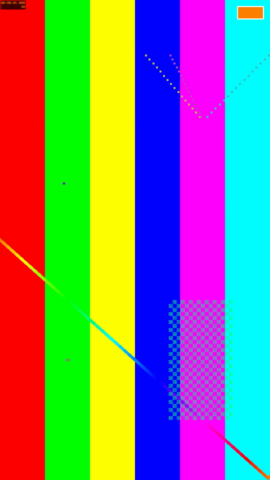
ffmpeg -v error -i vertical.mp4 -i logo.png -filter_complex "[1:v][0:v]scale2ref=w=iw/10:h=ow/mdar[logo][video];[video][logo]overlay=W-w-24:24,scale=270:480" -ss 1 -frames:v 1 vertical.png
in.mp4, w=iw/10:h=ow/mdar: differs from x=1128 y=24, 128x64 pixels
in.mp4, w=iw/10:h=-1: differs from x=1128 y=24, 128x72 pixels
hd.mp4, w=iw/10:h=ow/mdar: differs from x=1704 y=24, 192x96 pixels
hd.mp4, w=iw/10:h=-1: differs from x=1704 y=24, 192x108 pixels
vertical.mp4, w=iw/10:h=ow/mdar: differs from x=948 y=24, 108x54 pixels
vertical.mp4, w=iw/10:h=-1: differs from x=948 y=24, 108x192 pixels
in.mp4, scale=128:-1: differs from x=1128 y=24, 128x64 pixels- With
h=ow/mdarthe measured logo is 128x64 on the 1280-wide video, 192x96 on the 1920-wide one and 108x54 on the vertical 1080-wide one: each width is the video’s width divided by 10, and each logo is twice as wide as it is tall, likelogo.png. Each still starts 24 pixels from the right edge (1280 - 128 - 24 = 1128), becauseW-w-24uses the scaled width. - With
h=-1(the scale documentation: “If one and only one of the values is -n with n >= 1, the scale filter will use a value that maintains the aspect ratio of the input image”), the widths are the same but the heights are 72, 108 and 192: the shape of the video, not of the logo. The logo is stretched, and on the vertical video it is 108x192, taller than it is wide. Inscale2ref,-1follows the reference video. - When you already know the video’s width,
scale=128:-1on the logo alone gives the same 128x64.
scale2ref has two outputs, the scaled logo and the video passed through, which is why the graph names both ([logo][video]) and overlays the second with the first.
See-through: colorchannelmixer=aa=0.5
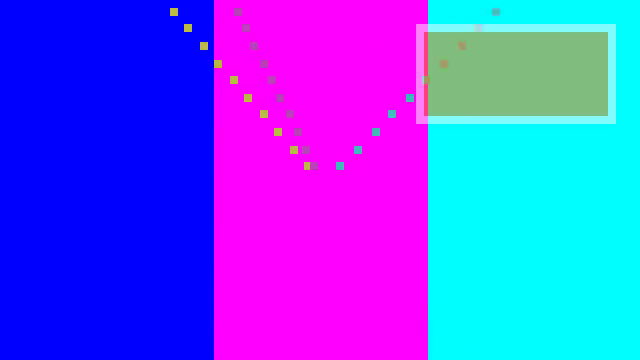
To make the logo half transparent, halve its alpha channel before the overlay. colorchannelmixer’s aa is documented as “Adjust contribution of input red, green, blue and alpha channels for output alpha channel.” and “Default is 1 for aa, and 0 for ar, ag and ab.”, so aa=0.5 multiplies each pixel’s alpha by 0.5 and leaves the colours alone. One pixel in the middle of the logo, measured at every step:
# Half see-through: colorchannelmixer=aa=0.5 multiplies the logo's alpha channel by 0.5.
ffmpeg -v error -i in.mp4 -i logo.png -filter_complex "[1:v]colorchannelmixer=aa=0.5[logo];[0:v][logo]overlay=W-w-24:24" -c:a copy half.mp4
# One pixel, measured: the middle of the logo (x=100 y=50 in logo.png), which lands on x=1156 y=74 in the video.
ffmpeg -v error -i logo.png -vf colorchannelmixer=aa=0.5 -f rawvideo -pix_fmt rgba half-logo.rgba
echo "logo pixel after aa=0.5 (R G B A): $(od -An -tu1 -j $(( (50 * 200 + 100) * 4 )) -N4 half-logo.rgba | xargs)"
echo "video pixel underneath (R G B): $(px base.rgb 1280 1156 74)"
raw with.rgb -i in.mp4 -i logo.png -filter_complex "[1:v]colorchannelmixer=aa=0.5[logo];[0:v][logo]overlay=W-w-24:24"
echo "blended, default overlay (R G B): $(px with.rgb 1280 1156 74)"
raw with.rgb -i in.mp4 -i logo.png -filter_complex "[1:v]colorchannelmixer=aa=0.5[logo];[0:v][logo]overlay=W-w-24:24:format=rgb"
echo "blended, overlay format=rgb (R G B): $(px with.rgb 1280 1156 74)"
# A logo whose alpha is 0 everywhere changes nothing.
ffmpeg -v error -f lavfi -i "color=c=0xFF8000@0:s=200x100,format=rgba" -frames:v 1 clear.png
raw with.rgb -i in.mp4 -i clear.png -filter_complex "overlay=W-w-24:24"
echo "alpha 0 logo: $(box with.rgb base.rgb 1280)"
# The top-right quarter of one frame at 1 second, full size, for this page.
ffmpeg -v error -ss 1 -i half.mp4 -vf crop=640:360:640:0 -frames:v 1 half.png
logo pixel after aa=0.5 (R G B A): 255 128 0 128
video pixel underneath (R G B): 0 254 254
blended, default overlay (R G B): 128 188 125
blended, overlay format=rgb (R G B): 128 191 127
alpha 0 logo: no pixel differsThe logo’s orange (255 128 0) now has alpha 128 out of 255: 0.5 x 255 = 127.5, stored as 128. The video underneath is cyan (0 254 254). Alpha blending gives each channel (logo x alpha + video x (255 - alpha)) / 255, with alpha 128 and 255 - 128 = 127:
| Channel | Arithmetic | Predicted | format=rgb | default yuv420 |
|---|---|---|---|---|
| red | (255 x 128 + 0 x 127) / 255 | 128 | 128 | 128 |
| green | (128 x 128 + 254 x 127) / 255 = 190.75 | 191 | 191 | 188 |
| blue | (0 x 128 + 254 x 127) / 255 = 126.50 | 127 | 127 | 125 |
With format=rgb the blended pixel is exactly the prediction, rounded. With the default yuv420 it is off by up to 3 (green 188 against 191), because the blend happens on brightness and on colour stored per 2x2 block, and the result is converted back to RGB for this measurement. On a watermark nobody will see 3 steps out of 255. A logo with alpha 0 everywhere changed no pixel at all, so the transparent parts of a real logo PNG leave the video as it is.
Only for a few seconds: enable
overlay supports the timeline enable option. The timeline editing section says: “If the evaluation is non-zero, the filter will be enabled, otherwise the frame will be sent unchanged to the next filter in the filtergraph.” The expression function between(x, min, max) is documented as “Return 1 if x is greater than or equal to min and lesser than or equal to max, 0 otherwise.” So enable='between(t,1,3)' shows the logo from 1 to 3 seconds, both ends included:
ffmpeg -v error -i in.mp4 -i logo.png -filter_complex "overlay=W-w-24:24:enable='between(t,1,3)'" -c:a copy timed.mp4
# The frame at each time with and without the timed overlay. -ss after the inputs is an
# output option, so the filter still sees each frame's own time.
for t in 0.5 2 3.5; do
  raw base-t.rgb -i in.mp4 -ss "$t"
  raw with.rgb -i in.mp4 -i logo.png -filter_complex "overlay=W-w-24:24:enable='between(t,1,3)'" -ss "$t"
  echo "t=$t s: $(box with.rgb base-t.rgb 1280)"
done
t=0.5 s: no pixel differs
t=2 s: differs from x=1056 y=24, 200x100 pixels
t=3.5 s: no pixel differsAt 0.5 s and 3.5 s the frame is untouched; at 2 s the logo is there, at the same 1056, 24 as without enable.
At 0.5 s and 3.5 s the frame is untouched; at 2 s the logo is there, at the same 1056, 24 as without enable.
Where -ss goes changes what t is. The ffmpeg documentation says that as an output option -ss “decodes but discards input until the timestamps reach position.”, which is what the loop above does. Before -i, as an input option, it “seeks in this input file to position.” Here is the 2-second frame taken that way:
# The same time, 2 s, with -ss before -i: an input option.
raw base-2.rgb -i in.mp4 -ss 2
raw with.rgb -ss 2 -i in.mp4 -i logo.png -filter_complex "overlay=W-w-24:24:enable='between(t,1,3)'"
echo "-ss 2 before -i: $(box with.rgb base-2.rgb 1280)"
-ss 2 before -i: no pixel differsThe logo is missing from a frame where the timed command above shows it. The seek moved the timestamps so the output starts at 0 (the documentation’s -copyts turns that off: “Do not process input timestamps, but keep their values without trying to sanitize them. In particular, do not remove the initial start time offset value.”), so the filter saw that frame at a t under 1. If you cut a clip and add a timed logo in one command with -ss before -i, the times in enable count from the cut, not from the start of the source.
A text watermark instead of a picture
For a channel name or a line of text instead of a logo file, the ffmpeg drawtext post puts text on a video directly, with its font, size, box and the same enable timing, and no PNG to make.
The frames
The three frames on this page are the PNGs this run wrote:
sha256sum corners.png vertical.png half.png6eb3ddf1afb37fa44baad451788ecef52d0fb2f26bb56f918e85fcc9176a3e6a corners.png
fdcd701862caca451cae94f76b298e3f8b423f04566aa177a8893685cf057e1c vertical.png
e1018b006a53bcd9c48f87490fdbed1f78b2a45c166a1566c6a43816be79c843 half.pngWhere ffmpeg 4.4.2 and today’s documentation differ
The overlay rules on this page are from the ffmpeg filters documentation for overlay, scale, colorchannelmixer, drawbox and timeline editing, and the expression evaluation section of the ffmpeg utilities documentation, all read on 2026-10-12, and from 4.4.2’s own ffmpeg -h filter=... help:
scale2ref: 4.4.2 has it. Today’s documentation has noscale2refsection; insteadscaletakes the reference video as a second input and names its sizerwandrh: “If any of these variables are present, this filter accepts two inputs.” Its logo example is[logo-in][video-in]scale=w=oh*dar:h=rh/10[logo-out], captioned “Scale a logo to 1/10th the height of a video, while preserving its display aspect ratio.” 4.4.2 does not knowrw:
{ ffmpeg -v error -i in.mp4 -i logo.png -filter_complex "[1:v][0:v]scale=w=rw/10:h=ow/dar[logo];[0:v][logo]overlay=W-w-24:24" -f null - 2>&1 || echo "exit status $?"; } | sed 's/ @ 0x[0-9a-f]*//g'[Parsed_scale_0] [Eval] Undefined constant or missing '(' in 'rw/10'
[Parsed_scale_0] Cannot parse expression for width: 'rw/10'
[AVFilterGraph] Error initializing filter 'scale' with args 'w=rw/10:h=ow/dar'
Error initializing complex filters.
Invalid argument
exit status 1overlay’salphaoption, which says whether the logo’s colours are already multiplied by its alpha: today’s documentation says “Default is auto.”; 4.4.2’s help says(default straight), and has noauto. Every blend on this page ran with 4.4.2’s straight default.overlay’sformatdefaults toyuv420in both, which is why the odd position and the blended pixel above behave as they do.colorchannelmixer’saais in both; 4.4.2’s help gives its range:(from -2 to 2) (default 1).
A logo on a Short
The Raspberry Pi pipeline that makes YouTube Shorts ends with a vertical video, “Final spec: 1080×1920”. On that frame the tenth-of-width logo above is 108x54, starting 24 pixels in from the right edge. Because the expressions use W, w and iw, the same graph fits the Short and a 1920x1080 video without changes; add it as the last step, after the clip is cut and sized.
What this page does not cover: an animated logo (a video or GIF as the second input), fading the logo in and out, and real logo artwork with soft, partly transparent edges. The logo here is a flat rectangle drawn by ffmpeg, so that every pixel it changed could be found and checked.
Follow new posts by RSS: paste dankdev.com/feed.xml into any feed reader. It is a plain XML file — no signup, no email address, no account. Posts land there the same day they go up, and there is nothing to unsubscribe from later.