ffmpeg drawtext: Title, Line Break, Timestamp
📅 October 12, 2026 · ⏱️ 20 min read
To put a centred title on a video with ffmpeg: ffmpeg -i in.mp4 -vf "drawtext=fontfile=/usr/share/fonts/truetype/dejavu/DejaVuSans-Bold.ttf:text='My Title':fontsize=96:fontcolor=white:x=(w-text_w)/2:y=(h-text_h)/2" -c:a copy out.mp4. drawtext is the filter that draws the text on every frame. fontfile names the font file to draw it with, text is the string, fontsize its size and fontcolor its colour. x and y place the top-left corner of the text; w and h are the width and height of the video and text_w and text_h those of the text, so (w-text_w)/2 is the left edge that centres it. -c:a copy keeps the sound as it is, because a filter on the picture means the picture has to be re-encoded but the audio does not.
ffmpeg -i in.mp4 -vf "drawtext=fontfile=/usr/share/fonts/truetype/dejavu/DejaVuSans-Bold.ttf:text='My Title':fontsize=96:fontcolor=white:x=(w-text_w)/2:y=(h-text_h)/2" -c:a copy out.mp4Two things below matter more than any single option: the escaping (a colon in your text cuts it short with no error, and \n is not a line break), and the fact that ffmpeg 4.4.2, the version Ubuntu 22.04 ships, lacks options the current documentation describes. Both are measured.
The test clip
Every command on this page ran with ffmpeg 4.4.2, the version Ubuntu 22.04 ships, in an empty directory, one block after another in the same bash shell. The clip is made by ffmpeg itself from its lavfi test sources, so you can rebuild it: a dark 1080x1920 background (the shape of a Short) with a faint grid, so you can see where text lands. The only font files used are DejaVu Sans Bold, /usr/share/fonts/truetype/dejavu/DejaVuSans-Bold.ttf, and in one line DejaVu Serif, DejaVuSerif.ttf in the same folder; both come from Ubuntu’s fonts-dejavu-core package, which was already on the machine.
The block also defines three small shell helpers that the rest of the page uses. frame grabs one frame of the clip with a filter applied, which is how the pictures on this page were made. Each was drawn at the full 1080x1920 and then shrunk to 360x640 by the scale at the end of the helper, so that a whole frame fits on your screen; every position and size on this page is in pixels of the full frame. ink draws the filter on a black frame and asks the bbox filter for the rectangle around every pixel it lit. sig prints an MD5 of a drawn frame: two equal MD5s mean two pixel-identical pictures, which is how this page proves what drawtext actually wrote.
# 6 s of a dark 1080x1920 background with a faint 10 x 10 grid, 30 fps, and a 440 Hz tone.
# -qp 0 makes libx264 lossless, so every frame grabbed below starts from exactly these pixels.
ffmpeg -v error -f lavfi -i "color=c=0x1d2b3a:s=1080x1920:r=30:d=6,drawgrid=w=108:h=192:t=2:c=white@0.15" \
  -f lavfi -i "sine=frequency=440:sample_rate=48000:duration=6" \
  -c:v libx264 -qp 0 -pix_fmt yuv420p -c:a aac -shortest in.mp4
ffprobe -v error -select_streams v -show_entries stream=width,height,r_frame_rate,nb_frames -of csv=p=0 in.mp4

# The font file every block uses (it ships with Ubuntu's fonts-dejavu-core package).
F=/usr/share/fonts/truetype/dejavu/DejaVuSans-Bold.ttf
# frame T FILTER OUT.png: the frame at T s of in.mp4 with FILTER applied, shrunk to 360x640 for
# this page. -ss comes after -i, so the filter sees the real timestamps (see the timestamp section).
frame() { ffmpeg -v error -i in.mp4 -vf "$2,scale=360:640" -ss "$1" -frames:v 1 "$3"; }
# ink FILTER: the rectangle around every pixel FILTER lights on a black 1080x1920 frame.
ink() { ffmpeg -hide_banner -f lavfi -i color=black:s=1080x1920 -vf "$1,bbox" -frames:v 1 -f null - 2>&1 | grep -o 'x1:.*h:[0-9]*'; }
# sig T FILTER: an MD5 of the frame at T s of a black 1080x1920 30 fps clip with FILTER applied.
# Two equal MD5s mean two pixel-identical pictures.
sig() { ffmpeg -v error -f lavfi -i color=black:s=1080x1920:r=30 -vf "$2" -ss "$1" -frames:v 1 -f md5 -; }1080,1920,30/1,180The clip has 180 frames at 30 per second: 6 s.
Font file, size and colour
fontfile is the path to a TrueType or OpenType file. fontsize is in pixels, fontcolor takes a colour name or a hex value, and @ after a colour sets its opacity from 0 to 1. Five lines on one frame, one drawtext per line, separated by commas:
frame 3 "drawtext=fontfile=$F:text='no fontsize':fontcolor=white:x=80:y=200,\
drawtext=fontfile=$F:text='fontsize=48':fontsize=48:fontcolor=white:x=80:y=360,\
drawtext=fontfile=$F:text='96 yellow':fontsize=96:fontcolor=yellow:x=80:y=560,\
drawtext=fontfile=$F:text='0xFF6A3D':fontsize=144:fontcolor=0xFF6A3D:x=80:y=800,\
drawtext=fontfile=/usr/share/fonts/truetype/dejavu/DejaVuSerif.ttf:text='Serif @0.6':fontsize=120:fontcolor=white@0.6:x=80:y=1100" font.png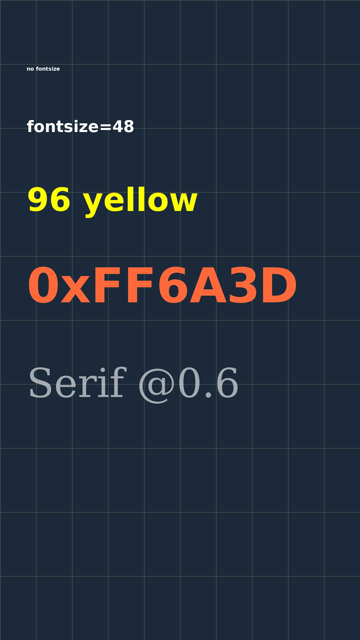
Five drawtext filters chained with commas, each with its own size, colour and font file.
How big is a size? Here is the lit height of a capital H at four sizes, and with no fontsize at all:
for s in 16 48 96 144; do echo "fontsize=$s  $(ink "drawtext=fontfile=$F:text='H':fontsize=$s:fontcolor=white")"; done
echo "no fontsize  $(ink "drawtext=fontfile=$F:text='H':fontcolor=white")"
sig 0 "drawtext=fontfile=$F:text='no fontsize':fontcolor=white"
sig 0 "drawtext=fontfile=$F:text='no fontsize':fontsize=16:fontcolor=white"
# No fontfile at all: ffmpeg asks fontconfig for "Sans".
fc-match Sans
sig 0 "drawtext=text='My Title':fontsize=96:fontcolor=white"
sig 0 "drawtext=fontfile=/usr/share/fonts/truetype/dejavu/DejaVuSans.ttf:text='My Title':fontsize=96:fontcolor=white"
fontsize=16 x1:1 x2:11 y1:0 y2:11 w:11 h:12
fontsize=48 x1:4 x2:35 y1:0 y2:34 w:32 h:35
fontsize=96 x1:8 x2:71 y1:0 y2:69 w:64 h:70
fontsize=144 x1:13 x2:107 y1:0 y2:104 w:95 h:105
no fontsize x1:1 x2:11 y1:0 y2:11 w:11 h:12
MD5=12fa8c5bbbb993798a4400ddb66d717d
MD5=12fa8c5bbbb993798a4400ddb66d717d
DejaVuSans.ttf: "DejaVu Sans" "Book"
MD5=06f8d14a4b89ed1bfbc9399b9d1568be
MD5=06f8d14a4b89ed1bfbc9399b9d1568beThe capital H is 0.73 of the font size at 48, 96 and 144 (35, 70 and 105 px tall), so fontsize is not the height of the letters: it is the size of the font’s design box, and DejaVu’s capitals fill about three quarters of it. Lower-case letters with descenders reach further down.
Leaving fontsize out gives exactly fontsize=16 (the same MD5): 12 px capitals, which is why the first line of the frame is unreadable on a 1080-wide video. The current documentation says “The default value of fontsize is 16.”; the 4.4.2 help lists fontsize without a default, but the measurement agrees with the docs.
fontfile is optional on a build with fontconfig, which the Ubuntu build has. With no fontfile, ffmpeg asks fontconfig for the family in the font option, “Sans” by default, and on this machine fc-match Sans answers DejaVuSans.ttf. The last two MD5s show that leaving fontfile out drew exactly the same pixels as naming DejaVuSans.ttf. On another machine “Sans” may be a different font, so name the file if the look matters.
Centring with x=(w-text_w)/2
T="drawtext=fontfile=$F:text='My Title':fontsize=96:fontcolor=white:x=(w-text_w)/2:y=(h-text_h)/2"
frame 3 "$T" centre.png
echo "ink  $(ink "$T")"
# box=1 with no border paints exactly text_w x text_h, so this measures the box drawtext centred
echo "box  $(ink "$T:box=1:boxcolor=white")"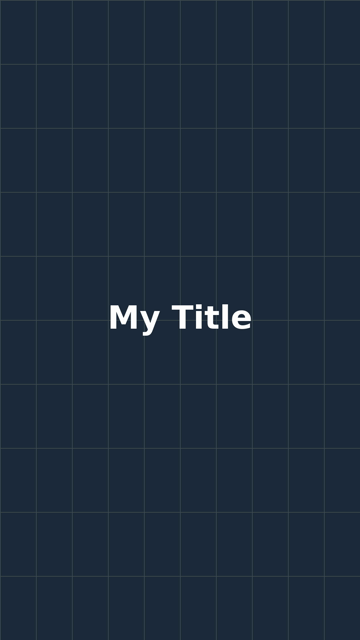
ink  x1:331 x2:752 y1:913 y2:1006 w:422 h:94
box  x1:323 x2:756 y1:913 y2:1006 w:434 h:94
The box drawtext centres is text_w x text_h, here 434 x 94 pixels, and it is centred exactly: 323 px of space on the left and 323 on the right, 913 above and 913 below. The lit pixels are not quite: 331 px on the left and 327 on the right, 2 px right of centre, because text_w includes the small gap each letter carries beside it: the M starts 8 px inside the box and the e ends 4 px before its right edge. Vertically the lit pixels are dead centre too, because y is the top of the tallest letter on the first line and, for this text, text_h is exactly the lit height.
A box behind the text
box=1 draws a filled rectangle behind the text, boxcolor is its colour (here black at 60% opacity, black@0.6), and boxborderw is how far it reaches past the text on each side:
frame 3 "$T:box=1:boxcolor=black@0.6:boxborderw=24" box.png
echo "border 24  $(ink "$T:box=1:boxcolor=white:boxborderw=24")"
# Today's docs accept one width per side; 4.4.2 takes a single number.
ffmpeg -v error -f lavfi -i color=black:s=1080x1920 -vf "$T:box=1:boxborderw=10|20" -frames:v 1 -f null - 2>&1 | grep -o 'Error setting option boxborderw to value 10|20.'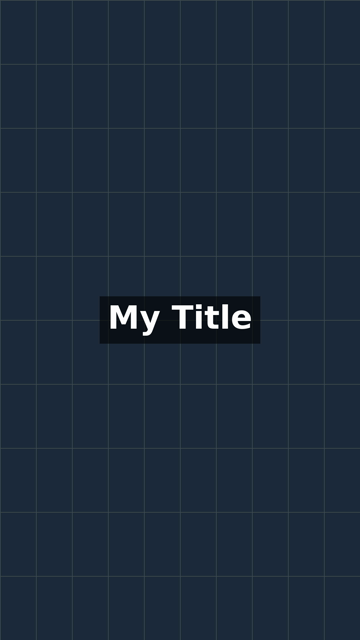
border 24  x1:299 x2:780 y1:889 y2:1030 w:482 h:142
Error setting option boxborderw to value 10|20.
With boxborderw=24 the box is 482 x 142 pixels: 434 + 2 x 24 wide and 94 + 2 x 24 tall, so the border is added on all four sides of the text_w x text_h box. The current documentation lets you give one width per side, for example “boxborderw=10|20 set the width of the top and bottom borders to 10 and the width of the left and right borders to 20”. On 4.4.2 that is an error, the last line above: boxborderw there is a single whole number.
Two ways to break a line
drawtext has no option for a line break. The text itself has to contain a newline character, and there are two ways to get one in.
1. Put the text in a file: textfile=
printf 'Step one:\nread the docs\n' > title.txt
frame 3 "drawtext=fontfile=$F:textfile=title.txt:fontsize=96:fontcolor=white:line_spacing=24:x=(w-text_w)/2:y=(h-text_h)/2" textfile.png
echo "ink  $(ink "drawtext=fontfile=$F:textfile=title.txt:fontsize=96:fontcolor=white:line_spacing=24:x=(w-text_w)/2:y=(h-text_h)/2")"
# The same two lines without the final newline:
printf 'Step one:\nread the docs' > no-final-newline.txt
sig 0 "drawtext=fontfile=$F:textfile=title.txt:fontsize=96:fontcolor=white"
sig 0 "drawtext=fontfile=$F:textfile=no-final-newline.txt:fontsize=96:fontcolor=white"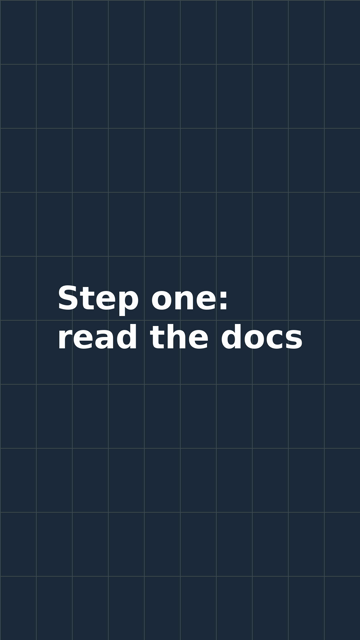
ink  x1:176 x2:905 y1:856 y2:1045 w:730 h:190
MD5=27afb107e66261c8bebf81a76ab91d55
MD5=27afb107e66261c8bebf81a76ab91d55
The file needs no escaping at all: the colon is just a colon. The newline at the end of the file changed nothing (the two MD5s are equal), so echo and editors that add one are safe here. Note what the centring did: x=(w-text_w)/2 centres the block, and inside it both lines start at the same left edge. 4.4.2 cannot centre each line; today’s documentation has a text_align option for that, and 4.4.2’s help does not list it. line_spacing=24 adds 24 px between the lines.
2. A literal newline inside the option
In bash you can press Enter inside the double quotes. The newline goes to ffmpeg as part of the text:
frame 3 "drawtext=fontfile=$F:text='Step one\:
read the docs':fontsize=96:fontcolor=white:line_spacing=24:x=(w-text_w)/2:y=(h-text_h)/2" newline.png
sig 0 "drawtext=fontfile=$F:text='Step one\:
read the docs':fontsize=96:fontcolor=white"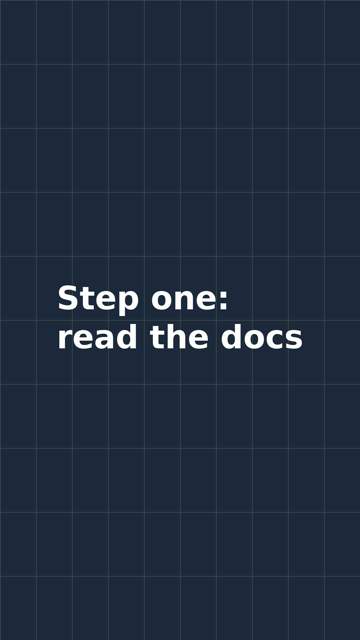
MD5=27afb107e66261c8bebf81a76ab91d55The MD5 is the one the textfile version printed, and sha256sum at the end of the page shows the two PNGs are the same file byte for byte. But the colon here has to be written \:, inside the single quotes, and that is the whole difference. Two parsers read the text before drawtext does. The first, the filtergraph parser, keeps everything inside single quotes as it is, backslash and commas included, and then drops the quotes. The second splits drawtext’s options at every colon, and turns \: into a plain colon instead of splitting there. That is two of the “up to four levels of escaping” the documentation warns about, which it ends with “using a text file with the textfile option avoids these problems.” Bash adds no level here because nothing in the text is special inside double quotes; a $ or a " in your title would be.
What does not work
# Typed \n: drawtext turns a backslash and the character after it into that character.
sig 0 "drawtext=fontfile=$F:text='Step one\:\nread the docs':fontsize=96:fontcolor=white"
sig 0 "drawtext=fontfile=$F:text='Step one\:nread the docs':fontsize=96:fontcolor=white"
echo "ink  $(ink "drawtext=fontfile=$F:text='Step one\:\nread the docs':fontsize=96:fontcolor=white")"
# The colon without its backslash:
ffmpeg -hide_banner -f lavfi -i color=black:s=1080x1920 -vf "drawtext=fontfile=$F:text='Step one:
read the docs':fontsize=96:fontcolor=white,bbox" -frames:v 1 -f null - 2>&1 | grep -o -e 'Using.*' -e 'x1:.*h:[0-9]*'
echo "exit status ${PIPESTATUS[0]}"
echo "ink  $(ink "drawtext=fontfile=/usr/share/fonts/truetype/dejavu/DejaVuSans.ttf:text='Step one':fontsize=96:fontcolor=white")"
MD5=6ec92077c6f4072749acecaabbfcf866
MD5=6ec92077c6f4072749acecaabbfcf866
ink x1:6 x2:1040 y1:0 y2:92 w:1035 h:93
Using "/usr/share/fonts/truetype/dejavu/DejaVuSans.ttf"
x1:6 x2:423 y1:0 y2:91 w:418 h:92
exit status 0
ink x1:6 x2:423 y1:0 y2:91 w:418 h:92Typing \n draws the letter n: the first two MD5s are the same picture as the text with a plain n, all on one line 1035 px wide. The documentation says why: a backslash “followed by any character, always expands to the second character.”
A colon without its backslash is worse, because nothing reports it. The text stopped at the colon, the lit area is 418 px wide, exactly that of “Step one” alone, and the log line shows ffmpeg drew it with DejaVuSans.ttf, not the bold file the command asked for. ffmpeg exited with status 0, and at -v error it printed nothing. If your title comes out short, or in the wrong font, look for an unescaped colon.
A running timestamp with %{pts\:hms}
%{...} in the text calls one of drawtext’s functions. pts is the frame’s timestamp, and its first argument hms formats it as hours, minutes, seconds and milliseconds. The colon between the two is escaped for the same reason as above:
frame 2.5 "drawtext=fontfile=$F:text='%{pts\:hms}':fontsize=96:fontcolor=white:box=1:boxcolor=black@0.6:boxborderw=24:x=60:y=120" timestamp.png
# What did it write at 2.5 s? Compare with two literal strings.
sig 2.5 "drawtext=fontfile=$F:text='%{pts\:hms}':fontsize=96:fontcolor=white"
printf ' 00:00:02.500' > with-space.txt
printf '00:00:02.500' > without-space.txt
sig 2.5 "drawtext=fontfile=$F:textfile=with-space.txt:fontsize=96:fontcolor=white"
sig 2.5 "drawtext=fontfile=$F:textfile=without-space.txt:fontsize=96:fontcolor=white"
# Without the backslash before the colon:
ffmpeg -v error -f lavfi -i color=black:s=1080x1920 -vf "drawtext=fontfile=$F:text='%{pts:hms}'" -frames:v 1 -f null - 2>&1 | head -1 | grep -o 'Unterminated.*'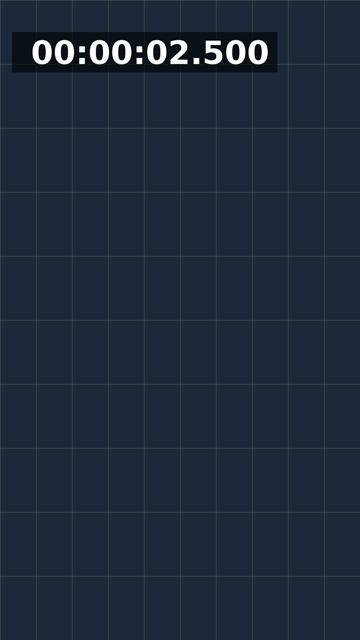
MD5=7bfce4072ba07c8301c7d53e992df3f5
MD5=7bfce4072ba07c8301c7d53e992df3f5
MD5=4d26040d64580808d7cf34ed930143df
Unterminated %{} near '{pts'
The frame at 2.5 s is identical to one drawn from a file holding ” 00:00:02.500” with a space in front, not to “00:00:02.500” without it. ffmpeg 4.4.2 writes a space where the minus sign of a negative time would go, which is why the box in the picture is wider on the left. The documentation describes the format as ”[-]HH:MM:SS.mmm” and does not mention the space. If you centre a timestamp with x=(w-text_w)/2, the digits sit half a space right of centre. Without the backslash, ffmpeg cannot find the end of %{ and prints the “Unterminated” error above for every frame.
Where you put -ss decides what the timestamp says:
# -ss before -i: ffmpeg seeks first, and the filter's clock starts at 0 on the frame it lands on.
printf ' 00:00:00.000' > zero.txt
ffmpeg -v error -ss 2.5 -i in.mp4 -vf "drawtext=fontfile=$F:text='%{pts\:hms}':fontsize=96:fontcolor=white" -frames:v 1 -an -f md5 -
ffmpeg -v error -ss 2.5 -i in.mp4 -vf "drawtext=fontfile=$F:textfile=zero.txt:fontsize=96:fontcolor=white" -frames:v 1 -an -f md5 -
ffmpeg -v error -ss 2.5 -i in.mp4 -vf "drawtext=fontfile=$F:textfile=with-space.txt:fontsize=96:fontcolor=white" -frames:v 1 -an -f md5 -
# The same seek, with 2.5 s added back by pts's second argument:
ffmpeg -v error -ss 2.5 -i in.mp4 -vf "drawtext=fontfile=$F:text='%{pts\:hms\:2.5}':fontsize=96:fontcolor=white" -frames:v 1 -an -f md5 -
MD5=719548ba0712780591c0ef87bda445fd
MD5=719548ba0712780591c0ef87bda445fd
MD5=dddeb4181bafa8786983fdc3072ac50f
MD5=dddeb4181bafa8786983fdc3072ac50fWith -ss 2.5 before -i, ffmpeg seeks first and the frame it lands on is time 0 to the filter: the clock read ” 00:00:00.000”, the same picture as that literal string, and not ” 00:00:02.500”. When you cut a clip and want the overlay to show the time in the original, put -ss after -i (slower, because every frame before it is decoded), or add the seek back as an offset: the second argument of pts is, in the documentation’s words, “an offset added to the timestamp”, and %{pts\:hms\:2.5} after -ss 2.5 drew the same picture as ” 00:00:02.500” (the last MD5, equal to the third).
Show text only between two times: enable
Every filter that supports the timeline (the 4.4.2 help for drawtext ends with “This filter has support for timeline through the ‘enable’ option.”) takes enable, an expression that switches it on and off per frame. between(t,2,4) is 1 when the time t is from 2 to 4 seconds:
E="drawtext=fontfile=$F:text='Part two':fontsize=96:fontcolor=white:box=1:boxcolor=0xFF6A3D:boxborderw=24:x=(w-text_w)/2:y=1400:enable='between(t,2,4)'"
frame 1 "$E" before.png
frame 3 "$E" inside.png
sig 0 "null"
for t in 1.967 2 3 4 4.033; do echo "t=$t  $(sig $t "$E")"; done
# Without the quotes, the commas inside between() split the filter chain:
ffmpeg -v error -f lavfi -i color=black:s=1080x1920 -vf "drawtext=fontfile=$F:text='x':enable=between(t,2,4)" -frames:v 1 -f null - 2>&1 | grep -o "Missing ')' or too many args in 'between(t'"
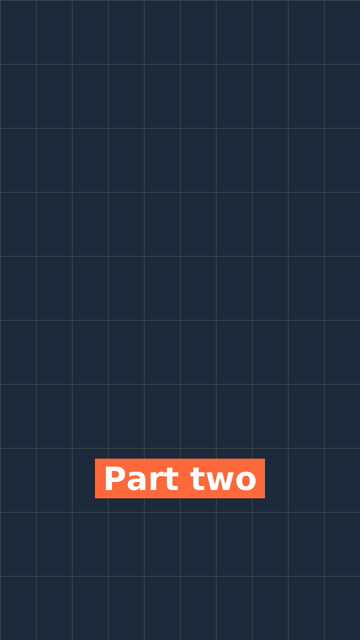
The same filter at 1 s, before the window (top), and at 3 s, inside it (bottom).
MD5=9b2c4088acb2c896d5d79adbe4b893ac
t=1.967  MD5=9b2c4088acb2c896d5d79adbe4b893ac
t=2  MD5=b274d0016814052ff21d47b876debd93
t=3  MD5=b274d0016814052ff21d47b876debd93
t=4  MD5=b274d0016814052ff21d47b876debd93
t=4.033  MD5=9b2c4088acb2c896d5d79adbe4b893ac
Missing ')' or too many args in 'between(t'
The first MD5 is the black frame with no filter at all. At 1.967 s and 4.033 s, one frame either side of the window at 30 frames per second, the picture is that empty frame; at 2, 3 and 4 s the text is there. So both ends are included: between(t,2,4) shows the text for 61 frames, not 60. The single quotes are needed: without them the commas inside between() end the filter, and ffmpeg fails with the error on the last line.
The frames
sha256sum font.png centre.png box.png textfile.png newline.png timestamp.png before.png inside.pngd82ec387cc460de71cb94a8ba868e0f008afc7fe82bfeb60ea6c5efc39678f32 font.png
06bf877eece74c52ccef263e8ea1146914a1110871ec86128687b3aff444cdc7 centre.png
416f16da2156c2a2dc833e37b7286df32a034526a6c8f20bd5a62cd099a8d382 box.png
595a2b3031b71324880108fe8012018d3d8e8e4cbe6d6f4ab1f6d745ea3fbc26 textfile.png
595a2b3031b71324880108fe8012018d3d8e8e4cbe6d6f4ab1f6d745ea3fbc26 newline.png
c981babdc5ca89dc09b24e449c2a98b8052537f679b8baa65bc7f0f9f10494ab timestamp.png
4acf54d7e23d70374779b0b75e26bac4be80a9ecbd1a5a122aace2fc63aa0958 before.png
37c5bc51a8b94c3ea30d319d3562cafdfc60303ce7fa40560493588308de6c84 inside.pngtextfile.png and newline.png have the same hash: the two ways to break a line drew the same picture.
Where ffmpeg 4.4.2 and today’s documentation differ
The option names and defaults on this page are from the drawtext section of the ffmpeg filters documentation, read on 2026-10-12, checked against what ffmpeg -h filter=drawtext prints on 4.4.2:
boxborderw: the docs take up to four widths (“boxborderw=10|20|30|40 set the borders width to 10 (top), 20 (right), 30 (bottom), 40 (left)”); 4.4.2 takes one number and rejects10|20.text_align,y_align,boxwandboxhare in the docs and not in 4.4.2. Withouttext_align, the lines of a multi-line text all start at the left edge of its box.fontsize: the docs give 16 as the default; 4.4.2’s help shows none, but leaving it out drew the same pixels asfontsize=16.reload: the docs say “The textfile will be reloaded at specified frame interval”; in 4.4.2 it is an on/off switch, “reload text file for each frame”.- The docs say the filter needs FFmpeg configured “with —enable-libfreetype and —enable-libharfbuzz”. The Ubuntu 4.4.2 build has libfreetype, libfontconfig and libfribidi but no libharfbuzz, and drawtext works.
%{pts\:hms}: the docs give the format as ”[-]HH:MM:SS.mmm”; 4.4.2 draws a space in front of a positive time.
Text on a Short
The Raspberry Pi pipeline that makes YouTube Shorts assembles each Short with ffmpeg: as that post describes the step, clips are trimmed, the audio is mixed and the result is encoded, and no text is drawn on the picture. If you add a title or a part number to clips like those, it is one more drawtext in the same -vf chain, and enable keeps it to the first seconds. For captions that follow the narration line by line, a subtitle file is less work than one drawtext per line: burning subtitles in with ffmpeg is measured on its own page.
What this page does not cover: the measurements are for DejaVu fonts on a flat background. Another font has other proportions, so measure it with the ink helper rather than trusting the 0.73 figure. Nothing here was checked against how any phone app or platform crops or covers the edges of a vertical video; leave room at the top and bottom of the frame.
Follow new posts by RSS: paste dankdev.com/feed.xml into any feed reader. It is a plain XML file — no signup, no email address, no account. Posts land there the same day they go up, and there is nothing to unsubscribe from later.