Stack Two Videos Side by Side With ffmpeg
📅 October 12, 2026 · ⏱️ 22 min read
To put two videos side by side with ffmpeg: ffmpeg -i left.mp4 -i right.mp4 -filter_complex hstack out.mp4. The hstack filter places the second video to the right of the first, so two 640x360 clips become one 1280x360 video. To stack one above the other, use vstack instead. Both need inputs that match: hstack inputs must have the same height, vstack inputs the same width, so clips of different sizes are scaled first. The output keeps one input’s sound, not both; amix mixes them.
ffmpeg -i left.mp4 -i right.mp4 -filter_complex hstack out.mp4Every command on this page ran on ffmpeg 4.4.2, the version Ubuntu 22.04 ships, and what it printed is shown under it. The sections below cover the size rule and its error, a 1080x1920 split-screen made from two clips of different sizes, what happens when one clip is shorter, a 2x2 grid with xstack, which input’s sound the output keeps, and a gap between the panes. Each layout has one frame from the run.
The test clips
All five clips are made by ffmpeg from its lavfi test sources, so you can rebuild them: left (5 seconds, 640x360) and right (3 seconds, 640x360, deliberately shorter) for the side-by-side examples, a (1920x1080, 16:9) and b (1280x720, a 720p clip) for the split-screen, and stereo (640x360 with two-channel sound) for the audio section. Each has its name drawn in the middle with DejaVu Sans Bold, /usr/share/fonts/truetype/dejavu/DejaVuSans-Bold.ttf, from Ubuntu’s fonts-dejavu-core package, which was already on the machine, and a sine tone as its sound.
The block also defines two helpers: info prints a file’s picture size, how long its video lasts and how many frames it really has (ffprobe decodes and counts them), and its sound’s length and channel count; frame saves one frame as a PNG for this page.
# Five test clips made by ffmpeg's lavfi sources, each with its name drawn in the middle
# (DejaVu Sans Bold, from Ubuntu's fonts-dejavu-core package) and a sine tone as its sound.
F=/usr/share/fonts/truetype/dejavu/DejaVuSans-Bold.ttf
# clip NAME SOURCE SIZE SECONDS TONE_HZ CHANNELS
clip() {
  ffmpeg -v error -f lavfi -i "$2=s=$3:r=30:d=$4,drawtext=fontfile=$F:text='$1':fontsize=h/3:fontcolor=white:box=1:boxcolor=0x00000099:x=(w-text_w)/2:y=(h-text_h)/2" \
    -f lavfi -i "sine=frequency=$5:sample_rate=48000:duration=$4" -ac "$6" \
    -c:v libx264 -pix_fmt yuv420p -c:a aac -shortest "$1.mp4"
}
clip left testsrc2 640x360 5 440 1
clip right testsrc 640x360 3 660 1
clip a testsrc2 1920x1080 5 440 1
clip b smptebars 1280x720 5 660 1
clip stereo rgbtestsrc 640x360 5 880 2

# info FILE: picture size, video length and frame count (ffprobe decodes and counts every
# frame), then the sound's length and channel count.
info() {
  IFS=, read -r w h d n < <(ffprobe -v error -select_streams v -count_frames -show_entries stream=width,height,duration,nb_read_frames -of csv=p=0 "$1")
  a=$(ffprobe -v error -select_streams a -show_entries stream=channels,duration -of csv=p=0 "$1")
  echo "$1: ${w}x$h, video $d s ($n frames)${a:+; audio ${a#*,} s, ${a%%,*} ch}"
}
# frame FILE SECONDS SIZE OUT.png: one frame of FILE at that time, resized for this page.
frame() { ffmpeg -v error -ss "$2" -i "$1" -vf "scale=$3" -frames:v 1 "$4"; }
for f in left right a b stereo; do info "$f.mp4"; done
left.mp4: 640x360, video 5.000000 s (150 frames); audio 5.000000 s, 1 ch
right.mp4: 640x360, video 3.000000 s (90 frames); audio 3.000000 s, 1 ch
a.mp4: 1920x1080, video 5.000000 s (150 frames); audio 5.000000 s, 1 ch
b.mp4: 1280x720, video 5.000000 s (150 frames); audio 5.000000 s, 1 ch
stereo.mp4: 640x360, video 5.000000 s (150 frames); audio 5.000000 s, 2 chThe answer command on left and right:
info out.mp4
frame out.mp4 4 960:270 hstack.png
out.mp4: 1280x360, video 5.000000 s (150 frames); audio 5.013000 s, 1 ch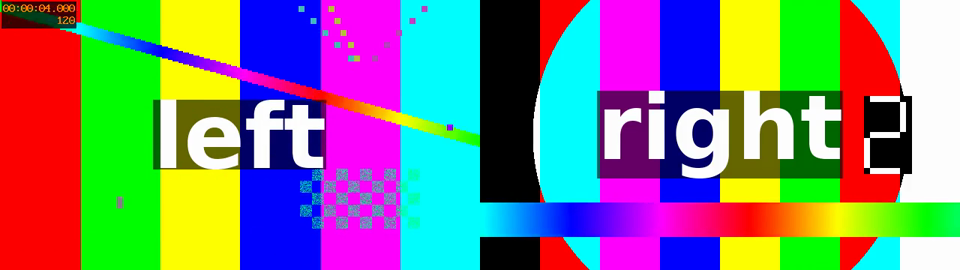
The output is 1280x360: the widths add up and the height stays. It lasts as long as the longer clip, 5 s, although right ends at 3 s. What fills the right half after that is covered under shortest.
The rule: same height for hstack, same width for vstack
The ffmpeg filters documentation for hstack, read on 2026-10-12, says “All streams must be of same pixel format and of same height.” and for vstack “All streams must be of same pixel format and of same width.” Neither filter resizes anything. Here is what 4.4.2 prints when a (1920x1080) and b (1280x720) are stacked as they are:
# Each error line names a memory address (" @ 0x...") that changes from run to run; sed drops it.
for f in hstack vstack; do
  { ffmpeg -v error -i a.mp4 -i b.mp4 -filter_complex $f -f null - 2>&1 || echo "exit status $?"; } | sed 's/ @ 0x[0-9a-f]*//'
done
[Parsed_hstack_0] Input 1 height 720 does not match input 0 height 1080.
[Parsed_hstack_0] Failed to configure output pad on Parsed_hstack_0
Error reinitializing filters!
Failed to inject frame into filter network: Invalid argument
Error while processing the decoded data for stream #1:0
exit status 1
[Parsed_vstack_0] Input 1 width 1280 does not match input 0 width 1920.
[Parsed_vstack_0] Failed to configure output pad on Parsed_vstack_0
Error reinitializing filters!
Failed to inject frame into filter network: Invalid argument
Error while processing the decoded data for stream #1:0
exit status 1The first line of each error is the useful one: it names the input and the size that does not match. The fix is to scale one input to the other’s height (for hstack) or width (for vstack). -2 tells scale to work out the other side from the aspect ratio and round it to an even number, which the H.264 encoder needs:
ffmpeg -v error -i a.mp4 -i b.mp4 -filter_complex "[1:v]scale=-2:1080[b];[0:v][b]hstack" side.mp4
ffmpeg -v error -i a.mp4 -i b.mp4 -filter_complex "[1:v]scale=1920:-2[b];[0:v][b]vstack" stacked.mp4
info side.mp4
info stacked.mp4
side.mp4: 3840x1080, video 5.000000 s (150 frames); audio 5.013000 s, 1 ch
stacked.mp4: 1920x2160, video 5.000000 s (150 frames); audio 5.013000 s, 1 chScaling b to 1080 high makes it 1920x1080, so side by side the output is 3840x1080; scaled to 1920 wide it is also 1920x1080, and stacked the output is 1920x2160. Both clips here are 16:9, so neither is distorted. Clips of different shapes also stack once one side matches, but the other side then differs, so the output has whatever size the two add up to; a split-screen needs each pane cut to one fixed size, which the next section does.
A 1080x1920 split-screen from two different clips
A split-screen for a vertical video puts one clip in the top half and one in the bottom half of a 1080x1920 frame, so each half is 1080x960. Neither source is that shape, so each one is scaled until it covers 1080x960 (force_original_aspect_ratio=increase) and the overflow is cropped off the sides, then the two halves are stacked:
ffmpeg -v error -i a.mp4 -i b.mp4 -filter_complex "[0:v]scale=1080:960:force_original_aspect_ratio=increase,crop=1080:960,setsar=1[top];[1:v]scale=1080:960:force_original_aspect_ratio=increase,crop=1080:960,setsar=1[bottom];[top][bottom]vstack" split.mp4
info split.mp4
ffprobe -v error -select_streams v -show_entries stream=sample_aspect_ratio,display_aspect_ratio -of csv=p=0 split.mp4
frame split.mp4 1 360:640 split.png
split.mp4: 1080x1920, video 5.000000 s (150 frames); audio 5.013000 s, 1 ch
1:1,9:16ffprobe reports 1080x1920, and a display aspect ratio of 9:16 with square pixels (sample aspect ratio 1:1). The 1920x1080 clip and the 1280x720 clip end up the same size, because both are 16:9; any source shape works the same way, it just loses more or less from its sides.

setsar=1 is in each half for a reason. Without it, the pane is marked with pixels that are not quite square:
# One pane without setsar=1, written as a one-frame file:
ffmpeg -v error -i a.mp4 -vf "scale=1080:960:force_original_aspect_ratio=increase,crop=1080:960" -frames:v 1 pane.mp4
ffprobe -v error -select_streams v -show_entries stream=sample_aspect_ratio,display_aspect_ratio -of csv=p=0 pane.mp45120:5121,640:569scale rounded the width while keeping the picture’s shape, and recorded the difference in the sample aspect ratio (5120:5121) instead of in the pixels. The setsar filter “sets the Sample (aka Pixel) Aspect Ratio for the filter output video”, so setsar=1 declares the 1080x960 pixels square. The difference is tiny here, but it is carried into the output file’s aspect ratio, so the split-screen above would no longer report exactly 9:16. The Raspberry Pi Shorts pipeline linked at the end of this page ends its one-clip filter chain the same way: scale=1080:1920:force_original_aspect_ratio=increase,crop=1080:1920,setsar=1. For one widescreen clip turned vertical, with blurred fill and padding as the alternatives to cropping, see 16:9 to 9:16 with ffmpeg.
When one clip is shorter: shortest
left lasts 5 seconds and right 3. Three ways to end the output with the shorter one:
ffmpeg -v error -i left.mp4 -i right.mp4 -filter_complex "hstack=shortest=1" short.mp4
ffmpeg -v error -i left.mp4 -i right.mp4 -filter_complex hstack -shortest short-opt.mp4
ffmpeg -v error -i left.mp4 -i right.mp4 -filter_complex "hstack=shortest=1" -shortest short-both.mp4
info short.mp4
info short-opt.mp4
info short-both.mp4
short.mp4: 1280x360, video 3.000000 s (90 frames); audio 5.013000 s, 1 ch
short-opt.mp4: 1280x360, video 5.000000 s (150 frames); audio 5.013000 s, 1 ch
short-both.mp4: 1280x360, video 3.000000 s (90 frames); audio 3.136000 s, 1 chhstack=shortest=1, the filter’s own option, cut the video at 3 s, but the sound (taken fromleft, see below) still runs 5.013 s.-shortestalone changed nothing: the video is still 5 s. The ffmpeg documentation’s-shortestreads “Finish encoding when the shortest output stream ends.” It compares the output’s streams, the stacked video and the one audio track, and both of those are 5 seconds long; the 3-second input is not an output stream.- Both together end the video at 3 s and the sound at 3.136 s, so the sound runs 0.136 s past the picture. If the two must end on the same frame, cut the sound as well, with
atrimor-t.
The hstack documentation describes shortest as “If set to 1, force the output to terminate when the shortest input terminates. Default value is 0.” With the default, the output runs to the end of the longest clip. This is what the right half shows after right has ended, hashed frame by frame before any encoding:
# The right half of every frame hstack makes, hashed before any encoding: how many different
# pictures are there while right.mp4 plays (frames 0-89), and after it has ended (90-149)?
ffmpeg -v error -i left.mp4 -i right.mp4 -filter_complex "hstack,crop=640:360:640:0" -an -f framemd5 - | grep -v '^#' > right-half.txt
awk -F', *' '$3 < 90 {a[$6]=1; last=$6} $3 >= 90 {b[$6]=1; if ($6 != last) d++} END {print length(a) " different pictures in frames 0-89; " length(b) " in frames 90-149, " d+0 " of them unlike frame 89"}' right-half.txt
90 different pictures in frames 0-89; 1 in frames 90-149, 0 of them unlike frame 89Every frame of the right half differs while right plays; after it ends, the right half is one picture for the remaining 2 seconds, and it is right’s last frame (frame 89), held. The frame at 4 seconds above shows it.
Which sound the output keeps
The answer command has no -map, so ffmpeg picks the audio itself. Its automatic stream selection rules say “for audio, it is the stream with the most channels” and “In the case where several streams of the same type rate equally, the stream with the lowest index is chosen.” left and right are both mono, so out.mp4 above got the first input’s sound: it lasts 5.013 s, which is left’s, not right’s 3 s. Put a stereo clip second and the second clip’s sound wins:
ffmpeg -v error -i left.mp4 -i stereo.mp4 -filter_complex hstack both.mp4
info both.mp4
both.mp4: 1280x360, video 5.000000 s (150 frames); audio 5.013000 s, 2 chboth.mp4 has 2 channels: the sound of stereo.mp4, the second input. So the kept sound depends on channel counts, not on which side a clip is shown. To choose, label the stacked video and map the sound you want, for example -map "[v]" -map 1:a. To hear both, mix them with amix:
ffmpeg -v error -i left.mp4 -i right.mp4 -filter_complex "[0:v][1:v]hstack[v];[0:a][1:a]amix=inputs=2[a]" -map "[v]" -map "[a]" mix.mp4
ffmpeg -v error -i left.mp4 -i right.mp4 -filter_complex "[0:v][1:v]hstack[v];[0:a][1:a]amix=inputs=2:normalize=0[a]" -map "[v]" -map "[a]" mix-sum.mp4
info mix.mp4
info mix-sum.mp4
# vol FILE FROM SECONDS: volumedetect's mean and peak level for that stretch of the sound.
vol() {
  v=$(ffmpeg -nostats -ss "$2" -t "$3" -i "$1" -map 0:a -af volumedetect -f null - 2>&1 | grep -E 'mean_volume|max_volume' | sed 's/.*\] //' | paste -sd ' ')
  echo "$1 from $2 s for $3 s: $v"
}
vol left.mp4 0 3
vol right.mp4 0 3
vol mix.mp4 0 3
vol mix.mp4 4.5 0.5
vol mix-sum.mp4 0 3
vol mix-sum.mp4 4.5 0.5
mix.mp4: 1280x360, video 5.000000 s (150 frames); audio 4.992000 s, 1 ch
mix-sum.mp4: 1280x360, video 5.000000 s (150 frames); audio 4.992000 s, 1 ch
left.mp4 from 0 s for 3 s: mean_volume: -21.1 dB max_volume: -17.9 dB
right.mp4 from 0 s for 3 s: mean_volume: -21.1 dB max_volume: -17.9 dB
mix.mp4 from 0 s for 3 s: mean_volume: -24.1 dB max_volume: -18.4 dB
mix.mp4 from 4.5 s for 0.5 s: mean_volume: -22.1 dB max_volume: -17.8 dB
mix-sum.mp4 from 0 s for 3 s: mean_volume: -18.1 dB max_volume: -12.4 dB
mix-sum.mp4 from 4.5 s for 0.5 s: mean_volume: -21.1 dB max_volume: -18.1 dBEach source tone alone measures -21.1 dB mean. With the default settings, amix scales its inputs so that two of them together come out quieter than either one alone: -24.1 dB while both play. The documentation’s normalize option is “Always scale inputs instead of only doing summation of samples.” and it is on by default. When right ends at 3 s, amix brings left back up gradually (“The transition time, in seconds, for volume renormalization when an input stream ends. The default value is 2 seconds.”), so in the last half second it is still at -22.1 dB, 1.0 dB under the source. With normalize=0 the inputs are just added: -18.1 dB while both play, peaking at -12.4 dB, and exactly the source’s -21.1 dB once left plays alone. That peak is well under 0 dB, the level where samples clip; two loud real tracks added together can pass it, so measure the peak or keep the default. By default amix runs for “The duration of the longest input.”, which here is 4.992 s of sound.
Four videos in a 2x2 grid: xstack
hstack and vstack make one row or one column. For a grid, xstack places each input at a position given in layout. The documentation, read on 2026-10-12, explains the syntax: “Each input is separated by ’|’.” “The first number represents the column, and the second number represents the row.” “Optionally one can use wX and hX, where X is video input from which to take width or height.” So w0_0 is the top row, moved right by the width of input 0, and 0_h0 is the left column, moved down by the height of input 0. Its own 2x2 example is xstack=inputs=4:layout=0_0|0_h0|w0_0|w0_h0, which fills the left column first. The command below lists the top row first instead, and scales a and b down to 640x360 so that all four cells are the same size:
ffmpeg -v error -i left.mp4 -i right.mp4 -i a.mp4 -i b.mp4 -filter_complex "[2:v]scale=640:360[c];[3:v]scale=640:360[d];[0:v][1:v][c][d]xstack=inputs=4:layout=0_0|w0_0|0_h0|w0_h0" grid.mp4
info grid.mp4
frame grid.mp4 1 640:360 grid.png
grid.mp4: 1280x720, video 5.000000 s (150 frames); audio 5.013000 s, 1 ch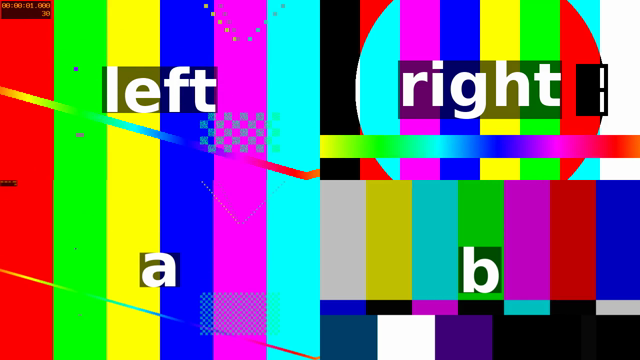
xstack does not resize anything either. If the cells are of different sizes, the documentation warns: “Note that if inputs are of different sizes gaps may appear, as not all of the output video frame will be filled.” Leave out layout with four inputs, or use the grid option from today’s documentation, and 4.4.2 refuses:
# Without a layout, and with today's grid option:
for opts in inputs=4 grid=2x2; do
  { ffmpeg -v error -i left.mp4 -i right.mp4 -i a.mp4 -i b.mp4 -filter_complex "[2:v]scale=640:360[c];[3:v]scale=640:360[d];[0:v][1:v][c][d]xstack=$opts" -f null - 2>&1 || echo "exit status $?"; } | sed 's/ @ 0x[0-9a-f]*//'
done
[Parsed_xstack_2] No layout specified.
[AVFilterGraph] Error initializing filter 'xstack' with args 'inputs=4'
Error initializing complex filters.
Invalid argument
exit status 1
[Parsed_xstack_2] Option 'grid' not found
[AVFilterGraph] Error initializing filter 'xstack' with args 'grid=2x2'
Error initializing complex filters.
Option not found
exit status 1grid=2x2 is in today’s documentation but not in 4.4.2 (Option 'grid' not found), whose ffmpeg -h filter=xstack lists inputs, layout, shortest and fill only. On 4.4.2 write the layout out.
A gap between the panes: pad
A line between the two halves of a split-screen is a pad: the filter will “Add paddings to the input image, and place the original input at the provided x, y coordinates.” Each half is cropped to 1080x950 and padded back to 1080x960, the top one with its picture at the top (pad=1080:960:0:0:white) and the bottom one with its picture 10 pixels down (pad=1080:960:0:10:white), so a 20-pixel white band separates them and the frame stays 1080x1920:
ffmpeg -v error -i a.mp4 -i b.mp4 -filter_complex "[0:v]scale=1080:950:force_original_aspect_ratio=increase,crop=1080:950,setsar=1,pad=1080:960:0:0:white[top];[1:v]scale=1080:950:force_original_aspect_ratio=increase,crop=1080:950,setsar=1,pad=1080:960:0:10:white[bottom];[top][bottom]vstack" gap.mp4
info gap.mp4
frame gap.mp4 1 360:640 gap.png
gap.mp4: 1080x1920, video 5.000000 s (150 frames); audio 5.013000 s, 1 ch
Change white to any colour name or hex value, and the 10s to change the width of the band. For a gap between side-by-side clips, pad the width instead: pad=iw+20:ih:0:0:white on the left clip before hstack.
The frames
The four frames on this page are the PNGs this run wrote:
sha256sum hstack.png split.png grid.png gap.png7ef081d14c713045a5ece4304815204244e38bb615643e9ae3d3fbe227faa078 hstack.png
aa0bb47e1b7a150395093f5e11ac9f0ad87b5755c501d7f3c9b7d62e111c9ded split.png
9b2211f8909852f3530d27074180b70d32d672f32fc8b1b31d811dd005c79fd7 grid.png
f296a7eda0a8aabbf815d8ee76e35a7ec464d3f99a610f5dd60bfa2c22d2b0b8 gap.pngWhere ffmpeg 4.4.2 and today’s documentation differ
The filter rules on this page are from the ffmpeg filters documentation for hstack, vstack, xstack, pad, setsar and amix, and from the stream selection and -shortest sections of the ffmpeg documentation, all read on 2026-10-12 and checked against what 4.4.2 prints:
hstack,vstack: the same options in both,inputsandshortest.xstack: today’s docs addgrid, which 4.4.2 rejects withOption 'grid' not found.layoutandfillare in both.amix:inputs,duration,dropout_transition,weightsandnormalizeare in both, with the same defaults.
Split-screens in a Short
The Raspberry Pi pipeline that makes YouTube Shorts scales and crops each clip to fill the frame, and its “Final spec: 1080×1920”. A split-screen is a two-input version of the same last step: two clips scaled and cropped to 1080x960, setsar=1, then vstack. Its other steps, trimming to the narration and mixing the sound, stay the same; map the sound you want rather than relying on which clip has more channels.
What this page does not cover: the clips are synthetic and all run at 30 frames per second. Clips with different frame rates were not tested; converting both with the fps filter (for example fps=30) before stacking makes them match. How any platform crops or covers a split-screen in its player is not covered either.
Follow new posts by RSS: paste dankdev.com/feed.xml into any feed reader. It is a plain XML file — no signup, no email address, no account. Posts land there the same day they go up, and there is nothing to unsubscribe from later.