Add Subtitles With ffmpeg: Soft or Burned In
📅 October 11, 2026 · ⏱️ 19 min read
To add subtitles with ffmpeg without re-encoding anything, put them in as a soft track: ffmpeg -i in.mp4 -i subs.srt -map 0 -map 1 -c copy -c:s mov_text out.mp4. Every stream is copied as it is, and the SRT is converted to mov_text, the text format an MP4 can hold. To burn them into the picture instead, so they show in every player and cannot be switched off, use the subtitles filter: ffmpeg -i in.mp4 -vf subtitles=subs.srt -c:a copy burned.mp4. That one re-encodes the video.
ffmpeg -i in.mp4 -i subs.srt -map 0 -map 1 -c copy -c:s mov_text out.mp4
ffmpeg -i in.mp4 -vf subtitles=subs.srt -c:a copy burned.mp4
Every command on this page ran with ffmpeg 4.4.2, the version Ubuntu 22.04 ships (built against libass 0.15.2), in an empty directory. The inputs are made by ffmpeg itself, so you can rebuild them: a 6-second 1080x1920 test pattern with a tone, and an SRT file with two cues. The first cue, Burned in: Hg, has a capital letter and a descender, so its height covers a full line of text.
# A 6-second 1080x1920 test clip with a 440 Hz tone, and an SRT file with two cues
ffmpeg -hide_banner -loglevel error -y \
  -f lavfi -i "testsrc2=size=1080x1920:rate=30:duration=6" \
  -f lavfi -i "sine=frequency=440:sample_rate=48000:duration=6" \
  -c:v libx264 -pix_fmt yuv420p -c:a aac in.mp4
cat > subs.srt <<'EOF'
1
00:00:00,000 --> 00:00:03,000
Burned in: Hg

2
00:00:03,000 --> 00:00:06,000
Second cue
EOF
Soft subtitles: the video is not touched
Compare the input, the soft-subtitle output and the burned-in output. For each stream, ffprobe prints the index, codec, type, bit rate, frame count and the default flag. The MD5 line hashes every compressed video packet.
for f in in.mp4 out.mp4 burned.mp4; do
  echo "$f"
  ffprobe -v error -of csv=p=0 \
    -show_entries stream=index,codec_name,codec_type,bit_rate,nb_frames:stream_disposition=default "$f"
  ffmpeg -v error -i "$f" -map 0:v -c copy -f md5 -
done
in.mp4
0,h264,video,6742997,180,1
1,aac,audio,68293,283,1
MD5=d6be8e4cd9d10cbad947601e5dd67f91
out.mp4
0,h264,video,6742997,180,1
1,aac,audio,68293,283,1
2,mov_text,subtitle,38,3,1
MD5=d6be8e4cd9d10cbad947601e5dd67f91
burned.mp4
0,h264,video,6327765,180,1
1,aac,audio,68293,283,1
MD5=dbc37720b2e0bf0e4b6e51a4b03f83ddout.mp4 has the same video line as in.mp4: h264 at 6742997 bit/s, 180 frames. It also has the same audio line and the same MD5, so its picture is the input’s, byte for byte. The only change is stream 2, mov_text. burned.mp4 has a different MD5 and a different bit rate (6327765), because the filter forces a re-encode. It has no subtitle stream, because the text is now part of the picture.
The -c:s mov_text is not optional. ffmpeg’s stream selection docs say so in an example: “No subtitle stream is chosen however, since the MP4 format has no default subtitle encoder registered, and the user hasn’t specified a subtitle encoder.” Ask for -c copy alone and ffmpeg tries to copy the SRT as subrip, which MP4 cannot hold. Matroska can, so the same copy into .mkv works:
ffmpeg -hide_banner -loglevel error -y -i in.mp4 -i subs.srt -map 0 -map 1 -c copy bad.mp4 2>&1 \
  | head -n 1 | sed 's/ @ 0x[0-9a-f]*//'
ffmpeg -hide_banner -loglevel error -y -i in.mp4 -i subs.srt -map 0 -map 1 -c copy out.mkv
ffprobe -v error -of csv=p=0 -show_entries stream=index,codec_name out.mkv
[mp4] Could not find tag for codec subrip in stream #2, codec not currently supported in container
0,h264
1,aac
2,subripThe first line is the MP4 error (the head -n 1 keeps just that line). In the MKV the stream stays subrip.
Whether anyone sees a soft track is up to the player. The 1 at the end of the mov_text line above is the default flag. ffmpeg’s Matroska muxer docs describe that flag as one that “influences which tracks players should play by default”: a hint for the player to read, not a switch. No player was tested for this page, so it makes no claim about which players show the track, or what YouTube does with one. If the text must appear, burn it in.
Burned in: what the force_style keys do
The subtitles filter draws the subtitles with libass. Its force_style option will “Override default style or script info parameters of the subtitles”, and takes KEY=VALUE pairs separated by commas. The keys are the fields of an ASS style. libass’s ASS File Format Guide defines them and points to Aegisub’s style documentation for detail:
FontName: “Fontname sets the family name of the desired font.” The family is looked up through fontconfig; see the missing-font error below.FontSize: “Fontsize floating point; sets the line height of text.” It is measured in script pixels, not video pixels (next section).PrimaryColour: “The main “fill” color of the body of the text.” Written&HAABBGGRR: “the order is ABGR. An alpha value of &H00 means fully opaque and a value of of &HFF fully transparent”. Yellow is&H0000FFFF.OutlineColour: “The border color of the text.” WithBorderStyle=3it also coloured the box in the frame below.BorderStyle: “1 for regular outlines expanding the shape of the glyphs or 3 to use rectangular boxes instead.”Outline: “the thickness of the border in script pixels if ScaledBorderAndShadow is enabled”, and ffmpeg’s SRT header enables it.0turns the outline off.MarginV: “For alignments (\an) 1-3, the vertical margin is relative to the bottom of the video frame; for 4-6 it doesn’t have any meaning, and for 7-9 it is relative to the top of the video frame.” Also in script pixels.Alignment: Numpad positions: “1, 2 and 3 are “subtitles” (i.e. drawn at the bottom of the frame)”, and “2, 5 and 8 are centered”.
How big FontSize 12, 18 and 24 are on a 1080x1920 frame
A font size means nothing until you know the height of the script it is measured against. To find out, render the first cue on a blank 1080x1920 frame at each size, and find the bounding box of every pixel that changed. The font is DejaVu Sans (the file is DejaVuSans.ttf), with outline and shadow off so that only the letters count. The last render uses no style at all:
# A blank 1080x1920 frame, the first cue at FontSize 12, 18 and 24, and the cue with no style at all
bg="color=c=0x30404f:s=1080x1920"
ffmpeg -hide_banner -loglevel error -y -f lavfi -i "$bg" -frames:v 1 blank.png
for fs in 12 18 24; do
  ffmpeg -hide_banner -loglevel error -y -f lavfi -i "$bg" -frames:v 1 \
    -vf "subtitles=subs.srt:force_style='FontName=DejaVu Sans,FontSize=$fs,Outline=0,Shadow=0'" fs$fs.png
done
ffmpeg -hide_banner -loglevel error -y -f lavfi -i "$bg" -frames:v 1 -vf subtitles=subs.srt default.png
# The bounding box of every pixel that differs from the blank frame
cat > bbox.py <<'EOF'
import subprocess, sys
W, H = 1080, 1920
def rgb(f):
    return subprocess.run(['ffmpeg', '-v', 'error', '-i', f, '-f', 'rawvideo', '-pix_fmt', 'rgb24', '-'],
                          capture_output=True, check=True).stdout
blank = rgb('blank.png')
for f in sys.argv[1:]:
    img = rgb(f)
    row = W * 3
    rows = [y for y in range(H) if img[y * row:(y + 1) * row] != blank[y * row:(y + 1) * row]]
    cols = [x for x in range(W) if any(img[y * row + x * 3:y * row + x * 3 + 3]
                                       != blank[y * row + x * 3:y * row + x * 3 + 3] for y in rows)]
    print(f'{f}: {rows[-1] - rows[0] + 1} px tall, {cols[-1] - cols[0] + 1} px wide, '
          f'{H - 1 - rows[-1]} px above the bottom edge')
EOF
python3 bbox.py fs12.png fs18.png fs24.png default.png
fs12.png: 68 px tall, 462 px wide, 68 px above the bottom edge
fs18.png: 102 px tall, 692 px wide, 68 px above the bottom edge
fs24.png: 134 px tall, 922 px wide, 70 px above the bottom edge
default.png: 104 px tall, 628 px wide, 62 px above the bottom edge| FontSize | Line height, FontSize x 1920 / 288 | Measured, top of H to bottom of g | Width of Burned in: Hg |
|---|---|---|---|
| 12 | 80 px | 68 px | 462 px, 43 % of the frame |
| 18 | 120 px | 102 px | 692 px, 64 % of the frame |
| 24 | 160 px | 134 px | 922 px, 85 % of the frame |
Why 288. When ffmpeg hands an SRT to libass, it writes a script header with PlayResY: 288 (shown in the SRT to ASS section below), and font sizes are in that script’s units. Aegisub’s Resolution and Matrix page says the script resolution “controls the coordinate system used by almost all coordinates and sizes in ASS subtitles”, and gives the example of a 2000x1000 script, where “Text with a font size of 100 (and no additional scaling) will take up 10 percent of the screen’s height.” By the same rule, FontSize 12 on a 288-line script is 12/288 of the frame height: an 80 px line on a 1920 px frame. Every script pixel is 6.67 video pixels. The letters themselves, from the top of the H to the bottom of the g, filled 0.85, 0.85 and 0.84 of that line at the three sizes. At FontSize 24, this 13-character cue already spans 85 % of the width, so a longer line will wrap.
With no style at all, subtitles=subs.srt drew text 104 px tall. The SRT default is Arial at 16, with an outline of 1 (the Style: line below). Arial is not installed on this machine, so libass used DejaVu Sans instead. The outline is 1 script pixel, 6.67 video pixels on each side.
The filter’s original_size option is the other scaling knob. ffmpeg 4.4.2’s help describes it as “set the size of the original video (used to scale fonts)”. The docs say it is needed “to correctly scale the fonts if the aspect ratio has been changed”. Nothing was resized here, so it played no part, and this page did not test it.
All the keys at once
Below is a yellow, boxed style lifted off the bottom, then the style the Shorts ffmpeg command builder writes when you tick “Burn in subtitles from subs.srt” (FontSize=12,Outline=2,MarginV=70, with no font named):
ffmpeg -hide_banner -loglevel error -y -f lavfi -i "color=c=0x30404f:s=1080x1920" -frames:v 1 \
  -vf "subtitles=subs.srt:force_style='FontName=DejaVu Sans,FontSize=18,PrimaryColour=&H0000FFFF,OutlineColour=&H80000000,BorderStyle=3,Outline=1,Shadow=0,Alignment=2,MarginV=70'" styled.png
ffmpeg -hide_banner -loglevel error -y -f lavfi -i "color=c=0x30404f:s=1080x1920" -frames:v 1 \
  -vf "subtitles=subs.srt:force_style='FontSize=12,Outline=2,MarginV=70'" builder.png
python3 bbox.py styled.png builder.png
styled.png: 135 px tall, 724 px wide, 459 px above the bottom edge
builder.png: 96 px tall, 488 px wide, 454 px above the bottom edgeMarginV=70 is 70 script pixels, or 467 px of a 1920 px frame. The measured gaps are a little smaller, 459 and 454 px, because the box and the outline stick out below the letters, and they are in script pixels too: Outline=2 adds 13.3 px around every letter. That is why the builder’s FontSize 12 text measured 96 px tall, 28 px more than the bare letters at the same size.
No Google or YouTube page was opened for this post, so it gives no “safe zone” figure. Whether 467 px clears the buttons a player draws over a Short is not something these measurements can tell you.
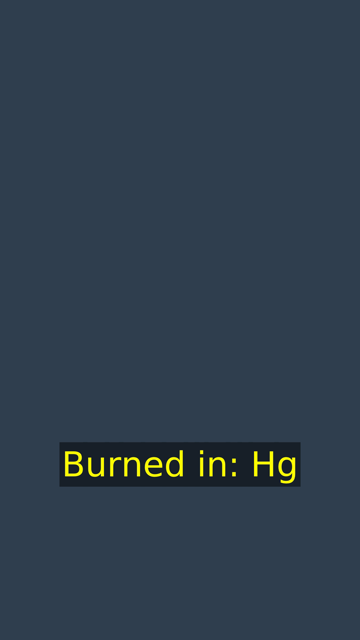
The frames below are the measured renders scaled to a third (360x640), so the whole frame fits. The text is where it sat on the full frame:
# The frames on this page: the measured PNGs scaled to a third, 360x640
for fs in 12 18 24; do
  ffmpeg -hide_banner -loglevel error -y -i fs$fs.png -vf scale=360:640 fontsize-$fs.png
done
ffmpeg -hide_banner -loglevel error -y -i styled.png -vf scale=360:640 styled-box.png
sha256sum fontsize-12.png fontsize-18.png fontsize-24.png styled-box.png
0862cb3f9f04e1a7d4486f76de3662b0947ad2add96f9011645c8e47221594d2 fontsize-12.png
9d53a6dba5acef59a7c1a6e7aa1dceb7137cd58a0d0c6d2d1a3245d17d8a44e8 fontsize-18.png
0b930710bf09df6eda5c2b47e2d1bce9189a5e88da91bce32b1632ad35bc3c37 fontsize-24.png
b8158de2e0a48032dfe82cd764bdaec4569a73de97cd4dd543087acad2290f40 styled-box.png


SRT to ASS, for full control
force_style changes one style for every line. For anything more, such as several styles, a position per line, or a script resolution equal to your frame, convert the SRT to ASS and edit the file:
ffmpeg -hide_banner -loglevel error -y -i subs.srt subs.ass
tr -d '\r' < subs.ass | grep -E '^(PlayRes|Scaled|Style|Dialogue)'
PlayResX: 384
PlayResY: 288
ScaledBorderAndShadow: yes
Style: Default,Arial,16,&Hffffff,&Hffffff,&H0,&H0,0,0,0,0,100,100,0,0,1,1,0,2,10,10,10,0
Dialogue: 0,0:00:00.00,0:00:03.00,Default,,0,0,0,,Burned in: Hg
Dialogue: 0,0:00:03.00,0:00:06.00,Default,,0,0,0,,Second cueThat is the header ffmpeg 4.4.2 writes for every SRT: a 384x288 script, Arial at 16, white (&Hffffff) with an outline of 1, alignment 2 and margins of 10. Those are the values force_style overrode above. The libass guide’s advice for new files is “When authoring new subs, use the same values as for LayoutResX and LayoutResY”, which it says should be the video’s native size. Set the script to 1080x1920 and font sizes become video pixels. The style line below also sets the last field, Encoding, to 1, because the guide says “Encoding MUST always be set to 1” (ffmpeg wrote 0):
sed -i -e 's/^PlayResX: .*/PlayResX: 1080/' -e 's/^PlayResY: .*/PlayResY: 1920/' \
  -e 's/^Style: Default,.*/Style: Default,DejaVu Sans,80,\&H00FFFFFF,\&H00FFFFFF,\&H00000000,\&H00000000,0,0,0,0,100,100,0,0,1,0,0,2,40,40,67,1/' \
  subs.ass
ffmpeg -hide_banner -loglevel error -y -f lavfi -i "color=c=0x30404f:s=1080x1920" -frames:v 1 \
  -vf subtitles=subs.ass ass80.png
python3 bbox.py ass80.png fs12.png
ass80.png: 68 px tall, 462 px wide, 68 px above the bottom edge
fs12.png: 68 px tall, 462 px wide, 68 px above the bottom edgeFontSize 80 on a 1920-line script drew exactly the same box as FontSize 12 on the 288-line one: 68 px tall, 462 px wide, 68 px up. 12 x 1920 / 288 is 80, so the two match. In this file, sizes, margins and outlines are all plain video pixels. Use the ass file the same way, with -vf subtitles=subs.ass.
Common errors, reproduced
A colon in the file name
The file name is an option value inside a filter graph, so ffmpeg unescapes it twice before it opens anything. The filtergraph escaping notes say “A first level escaping affects the content of each filter option value, which may contain the special character : used to separate values”, that a second level covers the whole filter description, and that the shell is a third. Below are three tries at a file called clip:v2.srt. Each is in single quotes, so the shell passes it unchanged:
cp subs.srt 'clip:v2.srt'
for vf in 'subtitles=clip:v2.srt' 'subtitles=clip\\:v2.srt' 'subtitles=./clip\\:v2.srt'; do
  echo "-vf $vf"
  if ffmpeg -hide_banner -loglevel error -y -f lavfi -i color=s=1080x1920 -frames:v 1 -vf "$vf" colon.png 2> err.txt
  then echo "  rendered"; else grep -E 'Unable|Protocol' err.txt | sed 's/ @ 0x[0-9a-f]*//; s/^/  /'; fi
done
-vf subtitles=clip:v2.srt
[subtitles] Unable to parse option value "v2.srt" as image size
-vf subtitles=clip\\:v2.srt
[Parsed_subtitles_0] Unable to open clip:v2.srt
Failed to inject frame into filter network: Protocol not found
-vf subtitles=./clip\\:v2.srt
renderedUnescaped, the colon ends the file name, and v2.srt becomes the filter’s second option, original_size, which expects a size. With \\:, both filter levels are satisfied: the graph turns \\ into \, and the option turns \: into :. The filter now asks for clip:v2.srt, but the file opener reads clip: as a protocol name, the way it reads http:. A leading ./ makes it a plain path.
A backslash in the file name
The same two levels apply to a file named my\subs.srt. Each level removes one backslash, so a literal one needs four:
cp subs.srt 'my\subs.srt'
for vf in 'subtitles=my\subs.srt' 'subtitles=my\\subs.srt' 'subtitles=my\\\\subs.srt'; do
  echo "-vf $vf"
  if ffmpeg -hide_banner -loglevel error -y -f lavfi -i color=s=1080x1920 -frames:v 1 -vf "$vf" slash.png 2> err.txt
  then echo "  rendered"; else grep -E 'Unable' err.txt | sed 's/ @ 0x[0-9a-f]*//; s/^/  /'; fi
done
-vf subtitles=my\subs.srt
[Parsed_subtitles_0] Unable to open mysubs.srt
-vf subtitles=my\\subs.srt
[Parsed_subtitles_0] Unable to open mysubs.srt
-vf subtitles=my\\\\subs.srt
renderedWindows paths such as C:\clips\subs.srt hit both problems at once. This page ran on Linux only, and cmd.exe and PowerShell quote differently, so no Windows form is given as tested. The simplest fix is a plain file name. The Shorts ffmpeg command builder only accepts plain names for this reason.
A font that is not installed
When the family in FontName is missing, the subtitles still render, in some other font, and at -loglevel error ffmpeg says nothing. Leave the log level at its default and libass prints a fontselect line naming the file it used. fc-match shows what fontconfig itself would pick:
for font in 'Comic Sans MS' 'Arial'; do
  ffmpeg -hide_banner -y -f lavfi -i color=s=1080x1920 -frames:v 1 \
    -vf "subtitles=subs.srt:force_style='FontName=$font'" font.png 2>&1 \
    | grep fontselect | sed 's/ @ 0x[0-9a-f]*//'
  fc-match "$font"
done
fc-match sans-serif
[Parsed_subtitles_0] fontselect: (Comic Sans MS, 400, 0) -> /usr/share/fonts/truetype/dejavu/DejaVuSans.ttf, 0, DejaVuSans
Z003-MediumItalic.otf: "Z003" "Medium Italic"
[Parsed_subtitles_0] fontselect: (Arial, 400, 0) -> /usr/share/fonts/truetype/dejavu/DejaVuSans.ttf, 0, DejaVuSans
NimbusSans-Regular.otf: "Nimbus Sans" "Regular"
DejaVuSans.ttf: "DejaVu Sans" "Book"Both missing families ended up as DejaVuSans.ttf, even though fc-match names Z003 for Comic Sans MS and Nimbus Sans for Arial. On this machine, libass did not take fontconfig’s nearest match. For both missing families, it used the same file that fc-match sans-serif names. To know which font was drawn, read the fontselect line, not fc-match. To use a font file that is not installed, the filter’s fontsdir option will “Set a directory path containing fonts that can be used by the filter”.
Where the docs and ffmpeg 4.4.2 differ
Today’s documentation lists two options that ffmpeg 4.4.2’s ffmpeg -h filter=subtitles does not have. wrap_unicode “requires at least libass release 0.17.0”, and this machine has 0.15.2. shaping picks the libass text shaper. Every other option used on this page (filename, original_size, fontsdir, force_style) is in both.
What this test does not tell you
- One font. All the heights are for DejaVu Sans. Another font fills a different share of the same line height, so measure yours with the bounding-box script.
- No player and no platform. The soft track was checked with ffprobe only. No player was opened, and nothing here says how YouTube treats either kind of subtitle.
- Linux only, ffmpeg 4.4.2 only. The escaping results are for bash on Linux. Other ffmpeg and libass builds may lay text out slightly differently.
Where this came from
The YouTube Shorts automation on a Raspberry Pi write-up assembles every Short with ffmpeg at 1080x1920, and its single-clip companion, the Shorts ffmpeg command builder, can burn in subs.srt with FontSize=12,Outline=2,MarginV=70. This page measured what that style means in pixels, and the soft-track alternative that leaves the video alone.
Follow new posts by RSS: paste dankdev.com/feed.xml into any feed reader. It is a plain XML file — no signup, no email address, no account. Posts land there the same day they go up, and there is nothing to unsubscribe from later.