Join Videos With ffmpeg: concat and Crossfade
📅 October 11, 2026 · ⏱️ 17 min read
To join videos with ffmpeg when every clip has the same codec, size and frame rate, list them in a text file and copy the streams: ffmpeg -f concat -safe 0 -i list.txt -c copy out.mp4. Nothing is decoded or encoded, so it is fast and loses no quality. If the clips differ in size, frame rate or pixel shape, the same command does not stop you: in the run below it exited with status 0 and wrote a broken file. Use the concat filter instead, after making every clip the same with scale, pad, setsar and fps, and re-encode.
printf "file '%s'\n" a.mp4 b.mp4 > list.txt
ffmpeg -f concat -safe 0 -i list.txt -c copy out.mp4
list.txt holds one file 'name' line per clip, in playing order. -safe 0 lets the list hold any path. The concat demuxer docs say of safe: “If set to 1, reject unsafe file paths and directives”, and a safe path is one that “does not contain a protocol specification and is relative and all components only contain characters from the portable character set (letters, digits, period, underscore and hyphen)”. “The default is 1”, so an absolute path such as /videos/a.mp4 needs -safe 0.
The test clips
Every command on this page ran with ffmpeg 4.4.2, the version Ubuntu 22.04 ships, in an empty directory. The clips are made by ffmpeg itself, so you can rebuild them. Each is a testsrc2 pattern with a label drawn a quarter of the way down by drawtext, using DejaVuSans-Bold.ttf, a font file already installed on this machine, and a tone of its own. a.mp4 and b.mp4 match: 1080x1920 at 30 fps, the shape of a Short. c.mp4 is a landscape 1920x1080 clip at 25 fps, the kind of clip that ends up in the same edit.
# Three test clips: a and b match (1080x1920, 30 fps), c is 1920x1080 at 25 fps.
# Each has a label a quarter of the way down and its own tone. Then print each clip's video stream.
F=/usr/share/fonts/truetype/dejavu/DejaVuSans-Bold.ttf
clip() {  # name size fps seconds label tone-Hz
  ffmpeg -hide_banner -loglevel error -y \
    -f lavfi -i "testsrc2=size=$2:rate=$3:duration=$4,drawtext=fontfile=$F:text='$5':fontsize=120:fontcolor=white:box=1:boxcolor=black:x=(w-tw)/2:y=h/4" \
    -f lavfi -i "sine=frequency=$6:sample_rate=48000:duration=$4" \
    -c:v libx264 -pix_fmt yuv420p -c:a aac "$1"
}
clip a.mp4 1080x1920 30 3 'clip A' 440
clip b.mp4 1080x1920 30 4 'clip B' 660
clip c.mp4 1920x1080 25 3 'clip C' 880
for f in a.mp4 b.mp4 c.mp4; do
  echo "$f $(ffprobe -v error -select_streams v -of csv=p=0 \
    -show_entries stream=width,height,r_frame_rate,time_base,duration $f)"
done
a.mp4 1080,1920,30/1,1/15360,3.000000
b.mp4 1080,1920,30/1,1/15360,4.000000
c.mp4 1920,1080,25/1,1/12800,3.000000The columns are width, height, frame rate, time base and duration. Note the time base: c.mp4 counts time in 1/12800 s steps and the other two in 1/15360 s. That matters in run 2.
Run 1: the concat demuxer on matching clips
This is the answer command again, with only warnings printed. Then each file’s duration and streams (type, codec, duration, frames or packets), and a check that matters more than any duration: decode every frame of out.mp4 and compare it with the decoded frames of a.mp4 followed by b.mp4.
ffmpeg -v warning -y -f concat -safe 0 -i list.txt -c copy out.mp4 2>&1 | sed -E 's/ @ 0x[0-9a-f]+//'
for f in a.mp4 b.mp4 out.mp4; do
  echo "$f $(ffprobe -v error -show_entries format=duration -of csv=p=0 $f)"
  ffprobe -v error -show_entries stream=codec_type,codec_name,duration,nb_frames -of csv=p=0 $f
done
for f in a b out; do
  ffmpeg -v error -i $f.mp4 -map 0:v -f framemd5 - | grep -v '^#' | awk -F', *' '{print $6}' > $f.md5
done
cat a.md5 b.md5 | cmp -s - out.md5 && echo "out.mp4: $(wc -l < out.md5) frames, the same pictures as a.mp4 then b.mp4"
[mp4] Non-monotonous DTS in output stream 0:1; previous: 144384, current: 144000; changing to 144385. This may result in incorrect timestamps in the output file.
a.mp4 3.000000
h264,video,3.000000,90
aac,audio,3.000000,142
b.mp4 4.000000
h264,video,4.000000,120
aac,audio,4.000000,189
out.mp4 7.022000
h264,video,7.000000,210
aac,audio,7.021333,331
out.mp4: 210 frames, the same pictures as a.mp4 then b.mp4The video is exactly the sum: 3.000000 s plus 4.000000 s gave 7.000000 s, and 90 plus 120 frames gave 210. The decoded pictures are identical to the inputs’, frame for frame, which a re-encode could not give: the streams were copied.
The audio is the one rough edge, and the warning says where. The demuxer starts each file where the previous one’s duration ends, so b.mp4’s first audio packet (at 144000 in 1/48000 s units, 3 s) lands before a.mp4’s last one has finished (144384). a.mp4’s AAC audio runs 0.008 s past its video. ffmpeg moves the timestamp forward and carries on. The joined audio is 7.021333 s, 0.021333 s longer than the video, which is less than one frame at 30 fps. That is why the warning appears even on clips that match.
Run 2: the concat demuxer on clips that do not match
Same command, a.mp4 (1080x1920, 30 fps) then c.mp4 (1920x1080, 25 fps). The warnings go to a log, which is counted. Then the file’s streams, and the size of every decoded frame, grouped, with the first and last timestamp of each group.
printf "file '%s'\n" a.mp4 c.mp4 > mixed.txt
ffmpeg -v warning -y -f concat -safe 0 -i mixed.txt -c copy mixed.mp4 2> mixed.log
echo "exit status $?"
grep -o 'Non-monotonous DTS in output stream 0:[01]' mixed.log | sort | uniq -c
ffprobe -v error -of csv=p=0 \
  -show_entries stream=codec_type,width,height,r_frame_rate,avg_frame_rate,duration,nb_frames mixed.mp4
ffprobe -v error -select_streams v -show_entries frame=pkt_pts_time,width,height -of csv=p=0 mixed.mp4 |
  awk -F, 'NF==3 { k=$2"x"$3
    if (k!=last) { if (last) print last, n, "frames,", first, "to", prev; first=$1; n=0; last=k }
    n++; prev=$1 } END { print last, n, "frames,", first, "to", prev }'
exit status 0
15 Non-monotonous DTS in output stream 0:0
1 Non-monotonous DTS in output stream 0:1
video,1080,1920,30/1,33/1,5.000000,165
audio,0/0,0/0,6.021333,284
1080x1920 90 frames, 0.021029 to 2.987695
1920x1080 75 frames, 2.921094 to 4.987695No error. ffmpeg exited with status 0 and wrote mixed.mp4. What is in it:
- The header describes only the first clip. The video stream says 1080x1920 at 30/1 fps, but 75 of its 165 frames are 1920x1080. Anything that reads only the header is told the wrong size for the second half of the file.
- The second clip plays fast.
c.mp4is 3.000000 s long, but its 75 frames are squeezed between 2.921094 s and 4.987695 s, a span of 2.066601 s. The average frame rate came out as 33/1, which is neither clip’s rate. - The clips overlap.
c.mp4’s first frame (2.921094 s) comes beforea.mp4’s last (2.987695 s). The 15 video warnings are the same collision seen from the muxer: decode timestamps that went backwards at the join, each moved forward by ffmpeg. - Picture and sound no longer end together. The video is 5.000000 s, the audio 6.021333 s, so the last 1.021333 s has sound and no new picture.
The pictures themselves did decode at both sizes. That is the demuxer’s auto_convert option at work. The docs say “the only conversion is adding the h264_mp4toannexb bitstream filter to H.264 streams in MP4 format. This is necessary in particular if there are resolution changes.” It keeps the frames decodable. It does not make the file correct. The same docs set the rule the clips broke: “All files must have the same streams (same codecs, same time base, etc.)”. These two do not even share a time base (1/15360 and 1/12800 in the first block). I did not trace exactly how ffmpeg remapped the second clip’s timestamps; the frame times above are what came out.
Run 3: the concat filter, after making the clips match
First the concat filter on the raw clips, to see what it says:
ffmpeg -v error -i a.mp4 -i c.mp4 \
  -filter_complex "[0:v][0:a][1:v][1:a]concat=n=2:v=1:a=1[v][a]" \
  -map "[v]" -map "[a]" -f null - 2> raw.log || echo "exit status $?"
sed -E 's/ @ 0x[0-9a-f]+//' raw.log | head -n 2
exit status 1
[Parsed_concat_0] Input link in0:v0 parameters (size 1920x1080, SAR 1:1) do not match the corresponding output link in0:v0 parameters (1080x1920, SAR 1:1)
[Parsed_concat_0] Failed to configure output pad on Parsed_concat_0Unlike the demuxer, the filter refuses, with exit status 1. The concat filter docs say why: “the filtering system will automatically select a common pixel format for video streams, and a common sample format, sample rate and channel layout for audio streams, but other settings, such as resolution, must be converted explicitly by the user.” (The message calls both sides in0:v0; that is how 4.4.2 printed it.)
So convert them. Each clip goes through the same chain before concat:
scale=1080:1920:force_original_aspect_ratio=decreaseshrinks the clip until it fits inside 1080x1920 without cropping. The landscape clip becomes 1080 wide.pad=1080:1920:(ow-iw)/2:(oh-ih)/2fills the rest with black, centred.setsar=1marks the pixels square, so both clips agree on pixel shape.fps=30puts both clips on one frame rate. Why that matters is the run after this one.
# Fit each clip inside 1080x1920 (bars where it does not fill), square pixels, 30 fps
N="scale=1080:1920:force_original_aspect_ratio=decrease,pad=1080:1920:(ow-iw)/2:(oh-ih)/2,setsar=1,fps=30"
ffmpeg -v error -y -i a.mp4 -i c.mp4 -filter_complex \
  "[0:v]$N[v0];[1:v]$N[v1];[v0][0:a][v1][1:a]concat=n=2:v=1:a=1[v][a]" \
  -map "[v]" -map "[a]" -c:v libx264 -pix_fmt yuv420p -c:a aac joined.mp4
ffprobe -v error -of csv=p=0 \
  -show_entries stream=codec_type,width,height,r_frame_rate,avg_frame_rate,duration,nb_frames joined.mp4
ffprobe -v error -select_streams v -show_entries frame=width,height -of csv=p=0 joined.mp4 | grep -v '^$' | uniq -c
video,1080,1920,30/1,30/1,6.000000,180
audio,0/0,0/0,6.016000,283
180 1080,1920This file is right. Every one of the 180 frames is 1080x1920, the header and the average frame rate both say 30/1, and 180 frames at 30 fps is 6 s, the 3 s of each clip. The audio is 6.016000 s. The cost is a re-encode of every frame, which the demuxer route avoids. The landscape clip sits in the middle with black bars above and below; to crop it or put a blurred copy behind it instead, see the fit modes below.
Do not skip the fps filter. The concat docs allow it (“Different frame rates are acceptable but will result in variable frame rate at output; be sure to configure the output file to handle it”), but here is what 4.4.2 did with that variable rate when writing an MP4. I stopped this run at 300 frames:
# The same graph without fps=30, stopped after 300 frames
S="scale=1080:1920:force_original_aspect_ratio=decrease,pad=1080:1920:(ow-iw)/2:(oh-ih)/2,setsar=1"
ffmpeg -v error -y -i a.mp4 -i c.mp4 -filter_complex \
  "[0:v]$S[v0];[1:v]$S[v1];[v0][v1]concat=n=2:v=1:a=0[v]" \
  -map "[v]" -c:v libx264 -pix_fmt yuv420p -frames:v 300 nofps.mp4
ffprobe -v error -show_entries stream=r_frame_rate,time_base,duration,nb_frames -of csv=p=0 nofps.mp41000000/1,1/1000000,0.000299,300With no fps in the graph, the output was given a frame rate of 1000000/1. 300 frames covered 0.000299 s of video, one frame every millionth of a second. A full six-second join at that rate would be six million frames. A run without the frame cap was still going when I stopped it after two minutes.
A crossfade: xfade and acrossfade
# offset = length of the first clip - length of the fade
N="scale=1080:1920:force_original_aspect_ratio=decrease,pad=1080:1920:(ow-iw)/2:(oh-ih)/2,setsar=1,fps=30"
FADE=1
OFFSET=$(ffprobe -v error -show_entries format=duration -of csv=p=0 a.mp4 | awk -v f=$FADE '{print $1 - f}')
echo "offset=$OFFSET"
ffmpeg -v error -y -i a.mp4 -i c.mp4 -filter_complex \
  "[0:v]$N[v0];[1:v]$N[v1];[v0][v1]xfade=transition=fade:duration=$FADE:offset=$OFFSET[v];[0:a][1:a]acrossfade=d=$FADE[a]" \
  -map "[v]" -map "[a]" -c:v libx264 -pix_fmt yuv420p -c:a aac faded.mp4
ffprobe -v error -of csv=p=0 \
  -show_entries stream=codec_type,width,height,avg_frame_rate,duration,nb_frames faded.mp4
offset=2
video,1080,1920,30/1,5.033333,151
audio,0/0,5.016000,237xfade overlaps the end of the first clip with the start of the second, so it needs to know when to start: offset, in seconds from the start of the first clip. For the fade to finish exactly as the first clip ends, offset = length of the first clip - length of the fade. Here that is 3 - 1 = 2, and the block works it out from ffprobe so it stays right for any first clip. Because the two clips overlap for one second, the result should be 3 + 3 - 1 = 5 s, or 150 frames at 30 fps.
The options, in the order the xfade docs give them, are transition, duration, offset and expr:
transition: “Default transition effect is fade.”duration: “Set cross fade duration in seconds.” “Range is 0 to 60 seconds.” “Default duration is 1 second.”offset: “Set cross fade start relative to first input stream in seconds.” “Default offset is 0.”expr: “Set expression for custom transition effect.”
The same docs say “Both inputs must be constant frame-rate and have the same resolution, pixel format, frame rate and timebase”, which is why each clip goes through the same $N chain first, fps=30 included. The audio gets acrossfade with the same one-second d. Its docs: “The cross fade is applied for specified duration near the end of first stream”, so it needs no offset.
Measured: the audio came out 5.016000 s, close to the 5 s expected. The video came out 5.033333 s, 151 frames, one frame more than the arithmetic. The next block looks for it.
# xfade's own output timestamps, in 1/30 s steps, before any encoder sees them
N="scale=1080:1920:force_original_aspect_ratio=decrease,pad=1080:1920:(ow-iw)/2:(oh-ih)/2,setsar=1,fps=30"
ffmpeg -v error -i a.mp4 -i c.mp4 -filter_complex \
  "[0:v]$N[v0];[1:v]$N[v1];[v0][v1]xfade=transition=fade:duration=1:offset=2[v]" \
  -map "[v]" -f framemd5 - | grep -v '^#' |
  awk -F', *' '{ n++ } NR>1 && $3!=p+1 { print "timestamp jumps from", p, "to", $3 } { p=$3 } END { print n, "frames" }'
# One frame from the middle of the fade (frame 75 = 2.5 s), shrunk to 360x640
ffmpeg -v error -y -i faded.mp4 -vf "select=eq(n\,75),scale=360:640" -frames:v 1 mid-fade.png
sha256sum mid-fade.png
timestamp jumps from 88 to 90
150 frames
d239120ecdddb36fcab4b940b5b99edff8d09f93cfbfe459a1a3830775525850 mid-fade.pngxfade itself sent out 150 frames, the right number, but one timestamp is missing: after 88 the next one is 90, in 1/30 s steps. The MP4 has 151 frames, one more than xfade sent: writing at a constant 30 fps, ffmpeg added a frame to cover the gap, and the file is 1/30 s longer. On 4.4.2 the arithmetic is right and the file still comes out one frame long. If your next step needs an exact length, trim with -t or check the result with ffprobe as above. I did not test whether newer ffmpeg releases do the same.
This is frame 75 of faded.mp4, 2.5 s in, halfway through the one-second fade:
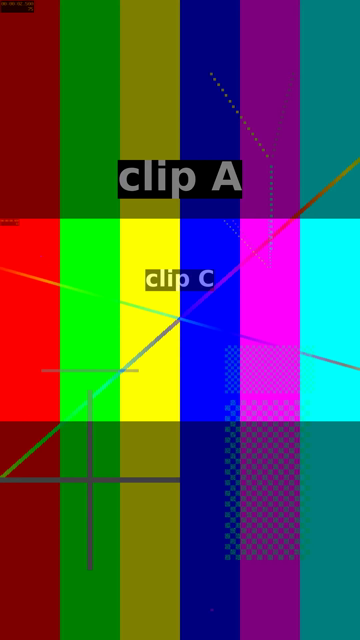
Both labels show at once because the picture is a 50/50 mix of the two clips. The dark bands are the black bars that pad added to c.mp4, half faded in.
Which one to use for a Short
In the YouTube Shorts automation on a Raspberry Pi pipeline, the clips that get merged are generated for the Short and are re-encoded at the end anyway (the final spec there is 1080x1920, H.264 CRF 18). When the join is part of that final encode, the concat filter adds no extra encode and protects you from the one clip that comes back at another size or frame rate. Use the demuxer with -c copy when you know the clips came from the same encoder with the same settings, such as several recordings from one camera, and you want the join fast and lossless.
The black bars in run 3 are the simplest fit. To crop a landscape clip to fill the frame, or to put a blurred copy of it behind, the Shorts ffmpeg command builder writes the command for one clip, with its “Centre crop”, “Blurred fill” and “Letterbox” modes. It keeps the clip’s own frame rate unless it is over 60 fps, so add fps=30 yourself before joining clips from different sources.
Where the docs and ffmpeg 4.4.2 differ
The quotes on this page are from today’s ffmpeg docs. ffmpeg -h on 4.4.2 lists the same xfade options in the same order, the same concat filter options (n, v, a, unsafe) and the same acrossfade duration and curve options, with three differences:
- xfade transitions. On 4.4.2
transitionruns “from -1 to 42”, ending atsqueezev. Today’s docs continue past it withzoomin,fadefast,fadeslow, thewindandcoverfamilies and therevealfamily. Those names do not exist in 4.4.2.fade, used here, is in both. - acrossfade inputs. Today’s docs list
inputs, n: “When crossfading multiple inputs, each input will be concatenated and crossfaded in sequence, similar to the concat filter.” 4.4.2 has no such option; itsacrossfadehas exactly two inputs,crossfade0andcrossfade1, so a chain of crossfades needs oneacrossfadeper join. - concat demuxer options. Today’s docs add
chapter_per_file. 4.4.2 has onlysafe,auto_convertandsegment_time_metadata.
What this test does not tell you
- One machine, one ffmpeg. Everything ran on 4.4.2. The missing
xfadetimestamp and the 1000000/1 frame rate withoutfpsmay behave differently in other releases. - Synthetic clips. Phone and camera files can have variable frame rates, rotation metadata or odd audio layouts that these clips do not.
- No player was tested. How a player shows
mixed.mp4was not checked; the page reports what ffprobe reads from it. - The audio join was not listened to. Run 1’s audio was measured by its timestamps only.
Follow new posts by RSS: paste dankdev.com/feed.xml into any feed reader. It is a plain XML file — no signup, no email address, no account. Posts land there the same day they go up, and there is nothing to unsubscribe from later.